Build tool use for agents with MCP and 3–5 tools for UK teams
Agent tool use is the mechanism that lets a large language model call executable functions or APIs instead of only generating text. Each tool gives the model a way to retrieve fresh data, run precise computation, or change the state of a real system. Instead of guessing an answer from training data, the agent looks up the answer, calculates it, or acts on it directly. That shift, from passive text generation to active task completion, is what separates a chatbot from a working agent.
TL;DR:
- Most successful agent tools focus on three to five specific, high-impact functionalities rather than attempting to integrate every possible system.
- Standard protocols like MCP enable scalable discovery, validation, and execution of tools, reducing the need for bespoke integrations at enterprise scale.
- Writing clear, single-purpose tools with strict schemas and concise descriptions ensures reliable tool selection and minimizes errors during operation.
- Rigorous evaluation at unit, scripted, and end-to-end levels helps identify schema issues, ambiguous calls, or token inefficiencies before deployment.
- Securing tools through risk-based permissions, audit logs, and human oversight is crucial to prevent high-impact errors and system breaches.
Table of Contents
- How tool use for agents actually works: the reasoning loop
- Common categories of tools for agents
- MCP and discovery protocols: standardising how agents find tools
- Design principles for writing tools agents can actually use
- Evaluation and metrics: testing tools and agents properly
- Security, permissions and guardrails for tool execution
- From prototype to production: how a consultancy builds tool-enabled agents
- What teams get wrong about tool use for agents
- Getting tool-enabled agents into production with Real-studios
- Sources
- FAQ
How tool use for agents actually works: the reasoning loop
Every tool-enabled agent runs on the same basic cycle, regardless of the framework behind it. The model reasons about a request, decides it needs external information or action, emits a structured tool call, waits for the result, and folds that result back into its next decision. This pattern is often called a ReAct-style loop, short for “reason and act,” and it repeats until the model has enough information to answer or the task is complete.
The mechanics matter more than the label. When an agent identifies a tool need, it does not call the function itself. It emits a structured invocation, typically JSON, naming the tool and its parameters. The surrounding runtime, not the model, actually executes that call against the real API or database, then feeds the result back into the model’s context so it can decide what happens next. Hugging Face’s agents course describes this exact separation of responsibilities between model and executor, and it is worth understanding because it explains most of the debugging headaches teams hit early on: a “failed” tool call is often a runtime problem, not a reasoning problem, and vice versa.
Function-calling is the specific capability that makes this loop possible. Rather than asking the model to write free text describing what it wants to do, function-calling gives the model a defined schema of available tools, their names, parameters, and expected types, so its output can be parsed reliably and mapped straight to code. Tool discovery is closely related: before the loop can run, the model needs to know what tools exist and how to call them. In simple setups, that list is hardcoded into the system prompt. In more sophisticated ones, discovery happens dynamically through a registry, which is where protocols like MCP come in.
The loop does not run forever. Well-designed agents have explicit stop conditions, and knowing them helps when things go wrong:
- The model reaches a final answer and stops calling tools voluntarily.
- A maximum iteration count is hit, preventing infinite tool-calling loops.
- A tool returns an error the agent cannot recover from.
- A timeout or token budget is exceeded mid-execution.
- A human-in-the-loop gate blocks further action pending approval.
Most production failures trace back to one of these conditions being missing or misconfigured, not to the underlying model being incapable.
Common categories of tools for agents
Mapping a task to the right tool category is the first real design decision in any agent build, and it is one many teams skip past too quickly. Six categories cover the overwhelming majority of production use cases.
Web search gives an agent access to information that postdates its training data or that changes too often to bake in, such as prices, news, or availability. This is the category most people associate with “AI search,” and tools like the AI Search Engine Checker are a useful illustration of how differently agents and traditional search engines surface the same content.
Retrieval tools pull domain-specific context an agent would otherwise have no access to, using techniques like retrieval-augmented generation (RAG), vector similarity search, or graph traversal over a knowledge base. This is the backbone of most customer-support and internal-knowledge agents, because it lets a model answer from a company’s actual documents rather than its general training.
Computation and code interpreter tools exist because language models are unreliable at arithmetic and exact transforms. Handing a calculation to a code interpreter, rather than asking the model to do long division in its head, turns a probabilistic guess into a deterministic result.
File and storage tools let an agent read, write, or modify documents and other artefacts, from generating a report to updating a spreadsheet.
Computer-use automation allows an agent to interact directly with a user interface, clicking and typing much like a person would. This matters for legacy systems with no API, but it is also, by design, one of the highest-risk tool categories, since the agent is directly manipulating a live interface rather than calling a scoped function.
Business and productivity tools cover the connective tissue of daily operations, such as sending notifications, updating a CRM record, or triggering a downstream workflow step.
A short list of the categories, side by side:
- Web search: current facts, prices, availability
- Retrieval (RAG, vector, graph): domain-specific context
- Computation/code interpreters: exact maths and data transforms
- File and storage tools: document and artefact read/write
- Computer-use automation: legacy UI interaction, treated as high risk
- Business/productivity tools: CRM updates, notifications, workflow triggers
Most production agents combine three or four of these, rarely all six. Microsoft’s tool-use design pattern documentation is a useful reference for teams mapping a specific task list against this taxonomy, particularly for guidance on function schemas and read-only access patterns for sensitive systems.
MCP and discovery protocols: standardising how agents find tools
The Model Context Protocol, or MCP, is an open standard that solves a problem most teams hit the moment they have more than a handful of tools: how does an agent discover what is available, read its schema, and call it, without every integration being bespoke plumbing? MCP standardises that entire exchange between a client (the agent) and a server (the tool provider) through a defined set of primitives, most notably tools/list for discovery and tools/call for execution, giving both sides a shared, predictable interface.
Before MCP, connecting an agent to ten different systems meant writing ten different integrations, each with its own authentication quirks and response format. MCP flips that around: build one MCP server per system once, and any MCP-compatible agent can discover and use it. That registry model, rather than a hardcoded tool list baked into a prompt, is what makes tool use scale past a handful of integrations.
A few architectural details make MCP more than a discovery mechanism:
- Tool metadata includes schemas, descriptions, and versioning, so agents can validate calls before executing them.
- Notifications let a server tell connected agents when tools change, are added, or are deprecated, without a full restart.
- Lifecycle management governs how servers register, authenticate, and deregister as systems evolve.
- Namespacing prevents naming collisions when dozens of tools from different servers are available in the same session.
It is worth being precise about what MCP replaces and what it does not. Function-calling, the model’s ability to emit a structured tool invocation, still happens inside the LLM itself. MCP does not replace that; it standardises everything around it, the discovery, transport, and registry layer that connects the model’s function-calling output to the actual tool implementation. Think of function-calling as the model’s vocabulary and MCP as the shared directory everyone agrees to use.
This distinction matters most at enterprise scale. Once an organisation has dozens of MCP servers exposing hundreds of tools, governance stops being optional. Red Hat’s engineering guidance on production MCP deployment is direct about this: enterprises need identity, lifecycle management, and observability layered on top of MCP servers before they go anywhere near production, because a registry with no access control is simply a larger attack surface.
Design principles for writing tools agents can actually use
Writing a tool for an agent is a different discipline from writing an API for a human developer, and treating the two as identical is the single most common design mistake. A human reads documentation once and remembers it; an agent reads the tool description fresh on every call, inside a limited context window, and has no memory of your intent beyond what the schema tells it.
- Keep each tool single-purpose. A tool that does one clearly named thing is far easier for a model to select correctly than one multipurpose function with a dozen optional parameters. Vague, overlapping tools are a leading cause of an agent calling the wrong one.
- Write strict, well-typed input schemas. Enforce required fields, valid enums, and sensible defaults at the schema level rather than hoping the model infers them from a description.
- Optimise for token efficiency. Concise, structured responses beat verbose ones. Build in pagination and filtering for anything that could return a large result set, and consider offering both a concise and a detailed response mode.
- Consolidate frequent multi-step flows. If an agent routinely calls three tools in sequence to complete one job, consider merging them into a single tool that performs the sequence internally. Fewer round trips mean fewer chances for the model to lose the thread.
- Namespace tools carefully. Avoid two tools with overlapping semantics or similar names; that ambiguity is exactly what causes incorrect tool selection at runtime.
- Treat tool descriptions as prompts. Write them the way you would write instructions for a competent but literal-minded colleague: state the purpose, give an example call, and describe what a typical error response looks like.
Anthropic’s engineering team, who have published some of the most detailed public guidance on this, frame it plainly: tools should be ergonomic, and ergonomics is discovered through iteration, not decided upfront on a whiteboard. Build a prototype tool, run it against real tasks, watch where the agent stumbles, then rewrite the description or schema. Repeat.
Pro Tip: Run the same tool description past a fresh instance of the model with no other context and ask it to explain, in its own words, what the tool does and when it would call it. If its explanation drifts from your intent, the description needs rewriting, not the model.
Evaluation and metrics: testing tools and agents properly
A tool that passes a manual smoke test can still fail badly in production, because the failure modes that matter, ambiguous tool selection, malformed schema compliance, silent token bloat, only show up under realistic load and varied phrasing. Evaluation needs to happen at three separate levels, each catching a different class of problem.
Unit tests check the tool in isolation: does it accept a valid schema, reject an invalid one cleanly, and return output in the documented format? This is standard software testing, applied to the tool layer specifically.
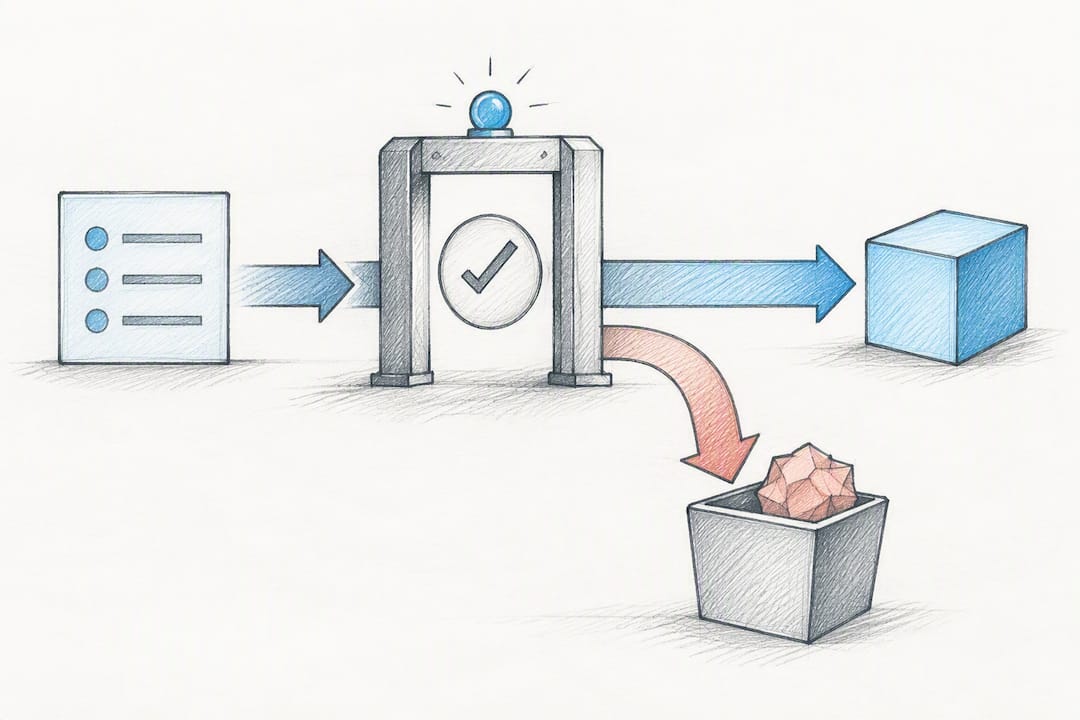
Automated evaluation agents run scripted task lists against the live tool set, simulating the kind of varied, occasionally ambiguous requests real users send. This surfaces problems unit tests cannot catch, like a model consistently reaching for the wrong tool when two descriptions overlap.
End-to-end interactive benchmarks measure whether the full agent, tools included, actually completes the task a user cares about, not just whether individual calls succeeded.
Track these metrics as you move through that progression:
- Tool-call count per task, since an efficient agent uses fewer calls to reach the same outcome.
- Token usage per interaction, which directly affects both cost and latency.
- Latency, particularly for chained tool calls where delays compound.
- Error rate per tool, broken out individually rather than averaged across the toolset.
- Task completion rate, the metric that ultimately matters to the business.
Anthropic’s own process is instructive here: they use agents themselves to analyse tool transcripts and flag where a description caused confusion, then feed that back into the next iteration of the tool spec. That evaluation-driven loop, rather than a one-off launch test, is what keeps a toolset reliable as usage patterns shift.
Security, permissions and guardrails for tool execution
Every tool you give an agent is a door into a real system, and the amount of trust you extend to that door should be proportional to what is on the other side of it. The first job in securing tool use is risk-rating each tool honestly: a read-only lookup is low risk, a database write is medium risk, and anything that sends money, deletes records, or emails a customer is high risk. Treat computer-use automation as high risk by default, since the agent is interacting directly with a live interface rather than a scoped function call.
Once tools are rated, apply least-privilege access as a default, not an afterthought. Where possible, give agents read-only copies or restricted views of sensitive systems rather than direct write access to production data. Secure authentication and token handling matter just as much as the permission model itself, since a well-scoped tool with poorly handled credentials is still a serious exposure point.
Beyond access control, four practices consistently separate safe deployments from risky ones:
- Log every tool call, including inputs, outputs, and the reasoning that triggered it, for later audit.
- Build observability dashboards that flag anomalous call patterns before they cause damage.
- Require human-in-the-loop approval for any destructive, high-cost, or irreversible action.
- Define clear escalation pathways so a blocked or failed high-risk call routes to a person, not a retry loop.
Red Hat’s enterprise MCP guidance frames this as a prerequisite, not a nice-to-have: role-based access control, signing, and observability need to sit around MCP servers before regulated organisations put tool-enabled agents anywhere near production systems.
From prototype to production: how a consultancy builds tool-enabled agents
Most agent projects fail not because the model is weak, but because the scope was too broad from day one. A disciplined build starts narrow: pick three to five high-impact tools tied to real, frequent tasks, rather than trying to wire up every system in the business at once. That narrower scope produces a working prototype in days rather than months, and it gives the team something concrete to test against real usage before committing further budget.
From there, the work shifts to evaluation and iteration. Running the agent through structured task lists exposes which tool descriptions confuse the model, which schemas are too loose, and which responses are burning unnecessary tokens. Each round of testing feeds directly back into refining the tool specs, not the underlying model.
Before anything reaches production, operational controls need to be in place: role-based access control matched to each tool’s risk level, audit logging on every call, and a tested rollback plan for anything that touches live data. None of this is optional once real customer data or real transactions are involved.
- Start with three to five tools tied to genuine, recurring tasks, not a full system rebuild.
- Run structured evaluation suites and revise tool specs based on where the agent actually stumbles.
- Put RBAC, logging, and rollback plans in place before go-live, not after.
- Plan for handover, monitoring, and periodic optimisation once the agent is live, not just launch day.
Launch is the midpoint, not the finish line. Usage patterns shift, new edge cases appear, and tool specs that worked well in testing often need adjustment once real customers start using the agent daily.
What teams get wrong about tool use for agents
The most common failure is tool overload: teams hand an agent twenty overlapping tools when five well-designed ones would perform better, because more tools means more ambiguity in tool selection, not more capability. A close second is vague schemas, descriptions written for a human skimming documentation rather than a model parsing intent on every single call. Token inefficiency compounds both problems quietly, since a verbose tool response eats context budget that should be spent reasoning about the task.
Watch three things over the next year. MCP adoption is moving from early enthusiasm to genuine enterprise infrastructure, particularly where governance layers like RBAC and audit logging are bolted on. Research into reinforcement-learning approaches for tool selection is maturing beyond simple prompting, aiming at agents that learn which tool to reach for rather than being told every time. And standardised tool registries will keep displacing bespoke, hardcoded tool lists as the default architecture.
If there’s one practical takeaway, it’s this: start with a small, well-specified toolset and instrument it heavily. The teams that scale successfully are the ones who caught their schema problems in week two, not month six.
— Oded
Getting tool-enabled agents into production with Real-studios
A consultancy can build custom AI agents with working demos delivered quickly, allowing you to test real tool integrations before committing to a full build. This approach puts a functioning prototype in front of you rapidly, backed by transparent pricing and clear ownership terms.
The services map directly onto what this article has covered. Rapid MVPs get a narrow, tool-enabled prototype running fast, using the same three-to-five-tool approach that avoids the overload problem discussed above. Automations & Workflow Design handles the multi-step flows and business-tool connections agents rely on day to day. AI Integrations & Enablement covers the harder production work: RBAC, audit logging, and ongoing support once the agent is live and handling real customer interactions.
The full service range, including GEO for AI-driven search visibility, sits on the services page. If you have a specific workflow in mind, that page is the place to start scoping it.
Sources
For teams building tool-enabled agents, a handful of primary sources are worth bookmarking directly. Anthropic’s engineering post on writing tools for agents remains the clearest practical guide to schema design and evaluation. The MCP specification and getting-started documentation covers the protocol in full technical detail. Hugging Face’s agents course tools primer and OpenAI’s practical guide to building agents both offer grounded, implementation-focused advice, while Microsoft’s beginners’ tool-use tutorial is a solid starting point for anyone new to the pattern.
- ai-agents-for-beginners/04-tool-use/README.md
- Model Context Protocol — getting started
- Writing effective tools for AI agents — Anthropic engineering
- Building effective AI agents with Model Context Protocol (MCP) — Red Hat Developer
FAQ
What tools can an agent use?
An agent can use any tool exposed through a defined schema, spanning web search, retrieval systems (RAG, vector, or graph databases), code interpreters, file and storage systems, computer-use automation for legacy interfaces, and business tools like CRMs or notification systems. The right mix depends entirely on the task; most production agents rely on three or four categories rather than all six.
What is the best tool for creating agents?
There is no single best tool since the right choice depends on your architecture, but the Model Context Protocol has become a leading standard for connecting agents to tools at scale, because it standardises discovery and invocation across systems. For teams that want a working prototype without building the integration layer themselves, a consultancy like Real-studios can scope and build a tool-enabled agent through its Rapid MVPs service.
What are the 5 main AI tools?
Definitions vary by source, but a commonly cited grouping covers web search, retrieval/RAG systems, code interpreters, file and storage tools, and business or productivity integrations. Computer-use automation is sometimes added as a sixth category for legacy systems without APIs.
What are the 4 AI tools?
This framing typically narrows the taxonomy to the four categories most agents rely on day to day: web search for current facts, retrieval tools for domain context, code interpreters for exact computation, and business or productivity tools for workflow actions. Coverage varies by source, so treat this as a practical starting point rather than a fixed standard.
How much does building a tool-enabled agent cost?
Pricing depends on scope, since agent projects range from a narrow single-workflow MVP to a full multi-system integration. Real-studios prices projects individually according to the defined scope of work; current details are available on the services page.