Ticket Routing AI: 90 Day Pilot Scorecard for ITSM
AI ticket routing reads incoming support requests, classifies intent and sentiment, and assigns each one to the resolver best placed to handle it, without a human triaging every queue. Service desks and ITSM teams running mature deployments typically see faster time-to-assign and fewer misroutes, with detailed benchmark ranges below. Support managers running high-volume queues and IT decision-makers under pressure to cut MTTR are the clearest beneficiaries.
TL;DR:
- High classification accuracy and under-one-minute time-to-assign are typical in mature AI deployments, significantly reducing misroutes compared to rule-based systems.
- Generative AI features have demonstrated measurable reductions in median resolution times, aiding faster support and higher customer satisfaction.
- Effective pilots require clean historical data, clear KPIs, embedded integration, and a minimum of 90 days to gather sufficient performance insights.
- Weak inputs, such as inconsistent labeling or over-reliance on external layers, can cause model drift, bias, and integration failures, undermining overall ROI.
- Starting with triage-only is advisable for small teams or tight timelines, while moving to auto-resolution requires stable processes, strong knowledge bases, and longer implementation periods.
Table of Contents
- How ticket routing AI works: the practical pipeline
- What the benchmark data actually shows
- What to evaluate before you buy: a features checklist
- How to roll out a pilot without breaking your queues
- Where AI ticket routing goes wrong
- Measuring the pilot: KPIs that actually tell you something
- An applied example: how a consultancy approaches routing projects
- Editor's perspective: triage-only versus triage-plus-autonomous resolution
- Get your ticket routing pilot scoped properly
- Sources
How ticket routing AI works: the practical pipeline
Most platforms follow a five-step pipeline, whether the vendor calls it "smart routing," "intelligent triage," or "AI ticket management." Understanding each stage matters because vendors describe the same mechanics with wildly different vocabulary, and buyers who don't know the underlying steps end up comparing marketing language rather than capability.
- Channel capture. The ticket arrives from email, chat, a web form, or a phone call, and gets normalised into a common internal format.
- Speech-to-text conversion. For voice channels, audio gets transcribed before any classification happens, and transcription quality caps everything downstream.
- Intent and sentiment classification. Natural language processing models read the ticket text and score it against a taxonomy of intents (billing query, access request, outage report) while a separate sentiment layer flags frustration or urgency.
- Context retrieval. The system pulls related history, past tickets from the same requester, matching knowledge-base articles, and account or asset data, so the resolver isn't starting cold.
- Confidence gating and routing. If the model's confidence score clears a set threshold, it auto-assigns or auto-responds; if it doesn't, the ticket falls back to a human triager rather than guessing.
That confidence gate is the single biggest difference from rule-based routing. Traditional systems route on fixed keywords or form fields: a ticket tagged "billing" always goes to the billing queue, regardless of what the customer actually wrote. Semantic ticket routing, by contrast, reads meaning rather than matching strings, so a ticket that says "my invoice charged me twice" and one that says "why was I billed again" both land in the same queue even though they share almost no keywords.
Manual triage, meanwhile, depends entirely on whoever picks up the ticket first correctly judging where it belongs, and that judgment degrades fast during a spike in volume. Predictive ticket routing tools address this by scoring likely resolution paths before a human ever looks at the ticket, which is a genuinely different capability from simple classification. Worth clarifying early: "AI ticket management" is the umbrella term covering the whole workflow, while "ticket classification AI" refers specifically to the intent-detection layer inside it. Vendors sometimes use the terms interchangeably to make a narrower tool sound broader than it is.
What the benchmark data actually shows
Early adopters of AI in IT service management report 40 to 90% faster resolution and 30 to 60% ticket deflection, alongside measurable SLA improvements. That's a wide range, and the width itself is the first thing worth understanding: it reflects the gap between organisations with clean data and tight integrations and those still running the tool on top of a messy taxonomy.
Benchmark snapshot: Mature AI deployments commonly reach high classification accuracy with a median time-to-assign under a minute, against rule-based misroute rates substantially higher in rule-based systems compared with lower rates in AI-assisted triage.
Here's what those figures mean in practice. A 38-second time-to-assign sounds trivial until you multiply it across a queue handling several thousand tickets a month. Every misroute costs far more than 38 seconds, because a misrouted ticket typically sits in the wrong queue, gets bounced back, and starts its resolution clock again from a worse position than if it had never been auto-routed at all.
Generative AI features specifically move the needle on resolution time. SolarWinds reported a noticeable relative reduction in average resolution time after enabling GenAI capabilities in their platform, a figure worth quoting to a finance director asking what "AI" actually buys beyond the licence fee.
Key metrics that matter for an ROI model:
- Time-to-assign: how long a ticket sits before reaching the right queue, ideally under a minute in mature deployments.
- Misroute rate: the percentage of tickets that land somewhere wrong and require reassignment.
- MTTR (mean time to resolution): the full clock from ticket creation to closure.
- FCR (first contact resolution): the share of tickets closed without escalation or a second contact.
- Deflection rate: the proportion of queries resolved by self-service or a bot before a human agent ever sees them.
- Backlog reduction: the change in aged, unresolved ticket volume over a given period.
A quick worked example. That's 1,000 tickets losing 12 minutes each, or 200 agent-hours a month. Cutting the misroute rate from 20% to the 5 to 9% range typical of AI-assisted triage recovers something in the order of 130 to 150 of those hours, which is where most payback calculations start. Industry ROI studies commonly cite typical payback periods commonly reported as about a year or longer for these deployments, largely because the integration and data-cleanup work upfront takes longer to pay off than the routing logic itself.
The range between the low and high end of every one of these figures comes down to two things: how clean the underlying ticket taxonomy is, and how tightly the AI layer integrates with the core ITSM platform rather than sitting beside it as a bolt-on.
What to evaluate before you buy: a features checklist
Vendor demos tend to showcase the easy cases. The checklist below covers what actually separates a genuinely capable platform from one that only performs well on curated examples.
- NLP accuracy and multi-intent handling. Can the model correctly parse a ticket that contains two problems at once, such as a billing query buried inside an access request?
- Channel parity. Does classification perform equally well across email, chat, and voice, or does accuracy drop sharply once speech-to-text enters the pipeline?
- Confidence thresholds and self-evaluation. Does the system expose its confidence score per ticket, and can your team tune the threshold at which it defers to a human?
- Audit logs and explainability. Can you see why a given ticket was routed where it was, for compliance review and for debugging misroutes?
- Integration depth. Is the AI layer embedded natively into your ITSM platform's taxonomy, or does it sit as an external layer requiring constant syncing?
- Skills-based and dynamic routing. Does the system route by resolver skill and current load, not just by category, so a specialist isn't buried under low-priority tickets while a generalist queue sits idle?
- Availability and load balancing. Does routing account for agent shift patterns, out-of-office status, and real-time capacity?
- Retraining and maintenance cadence. How often does the model get retrained on new ticket data, and what triggers a retraining cycle?
Pro Tip: Ask any vendor for their confidence-threshold default and whether you can adjust it per queue. A platform that hides this setting is usually hiding a lower accuracy rate than the one it advertises.
Integration depth deserves particular weight in that list. Platforms that sit outside the core ITSM system and require constant syncing tend to create data silos and erode the ROI case over time, according to research into AI adoption barriers in service management. Embedding the routing logic directly into your platform's own taxonomy tends to produce cleaner outcomes than layering a separate tool on top and hoping the two stay in sync.
How to roll out a pilot without breaking your queues
A 90-day pilot gives you enough ticket volume to reach statistical confidence without betting your whole service desk on unproven logic. Here's a sequence that keeps risk contained.
- Audit your data readiness first. Look at your existing taxonomy, the health of your knowledge base, and pull a sample of at least a few hundred historical tickets to check how consistently they were labelled. Inconsistent historical labelling is the single most common reason a pilot underperforms.
- Decide embed versus augment. Choose whether the AI layer will sit inside your existing ITSM platform's own logic or run alongside it as a separate service. Embedding reduces the ongoing sync burden and tends to produce better long-term outcomes, per the same research on integration barriers.
- Select a contained pilot queue. Pick one or two ticket categories with high volume but moderate complexity. Avoid starting with your most sensitive or highest-stakes queue.
- Set your KPIs and confidence gates before launch. Define time-to-assign, misroute rate, and MTTR targets upfront, along with the confidence threshold below which a ticket falls back to human triage.
- Define rollback criteria in writing. Agree the specific misroute rate or MTTR regression that triggers a pause, before the pilot starts, not after something goes wrong.
- Train agents on the new escalation flow. Resolvers need to understand why a ticket landed with them and how to flag a misclassification back into the system.
- Run the pilot for a full 90 days minimum. Shorter windows rarely capture enough ticket volume to distinguish genuine improvement from normal week-to-week variance.
- Review, retrain, and set an ongoing maintenance cadence. Decide how often the model retrains on fresh ticket data and who owns that review.
Governance sits underneath every one of those steps. Analyst guidance on agentic AI in service management consistently recommends cautious, governed roll-outs with clear measurement controls rather than a flat switch-on, and that caution is exactly what separates the pilots that scale from the ones that quietly get switched off after month four. For teams handling the underlying integration work themselves, structured integration support can shorten the audit-to-pilot timeline considerably.
Where AI ticket routing goes wrong
Every one of the benefits above assumes clean inputs and honest governance. Neither is guaranteed, and the failure modes are predictable enough to plan around.
- Garbage in, garbage out. A model trained on inconsistently labelled historical tickets inherits every inconsistency, and no amount of NLP sophistication fixes a broken taxonomy underneath it.
- Overstated autonomy. Vendors sometimes present "deflection" and "resolution" as interchangeable, when a deflected ticket that bounces back into the queue three days later hasn't actually been resolved at all; always ask for the exact denominator behind an "autonomous resolution" figure.
- Model drift. Classification accuracy degrades as ticket language and product lines evolve, which is why a fixed retraining cadence matters more than a one-time accuracy score.
- Priority gaming during spikes. During an incident surge, some routing logic starts optimising for speed over correctness, quietly deprioritising complex tickets that need more context.
- Bias in historical labelling. If past triage decisions were inconsistent across shifts or teams, the model learns those inconsistencies as if they were rules.
- Integration fragility. A routing layer bolted onto the outside of your ITSM platform, rather than embedded within it, breaks more often during platform updates and creates silent data silos.
None of this argues against adoption. It argues for treating the first 90 days as evidence-gathering, not a victory lap.
Measuring the pilot: KPIs that actually tell you something
Two categories of metric matter here, and conflating them is a common mistake. Primary KPIs tell you whether the routing itself works: time-to-assign, misroute rate, MTTR, FCR, deflection rate, and SLA compliance. Secondary KPIs tell you whether the experience around routing is improving: transfers per contact, backlog age, reopen rate, and CSAT.
A useful pilot scorecard tracks both relative and absolute numbers side by side, capturing the percentage reduction in misroutes alongside the actual minutes saved per ticket, because a large percentage improvement on a tiny base number can look impressive while changing almost nothing operationally.
For sample size, aim for enough ticket volume per category to smooth out weekly noise, typically several hundred tickets minimum per queue before drawing conclusions. A dashboard tracking these KPIs doesn't need to be elaborate: a weekly trend line for misroute rate and MTTR, a rolling FCR percentage, and a simple before/after comparison against your pre-pilot baseline covers most of what a steering committee will ask for.
- Time-to-assign trend, weekly
- Misroute rate, weekly, against benchmarks reflecting mature deployments show lower misroute rates
- MTTR before versus during pilot
- FCR percentage
- SLA compliance rate
- CSAT delta, if measured pre-pilot
Handle-time and satisfaction gains compound further when routing is paired with real-time agent guidance rather than deployed as a standalone triage layer, according to research into AI-assisted support workflows, which is worth keeping in mind when scoping what "success" means for your pilot.
An applied example: how a consultancy approaches routing projects
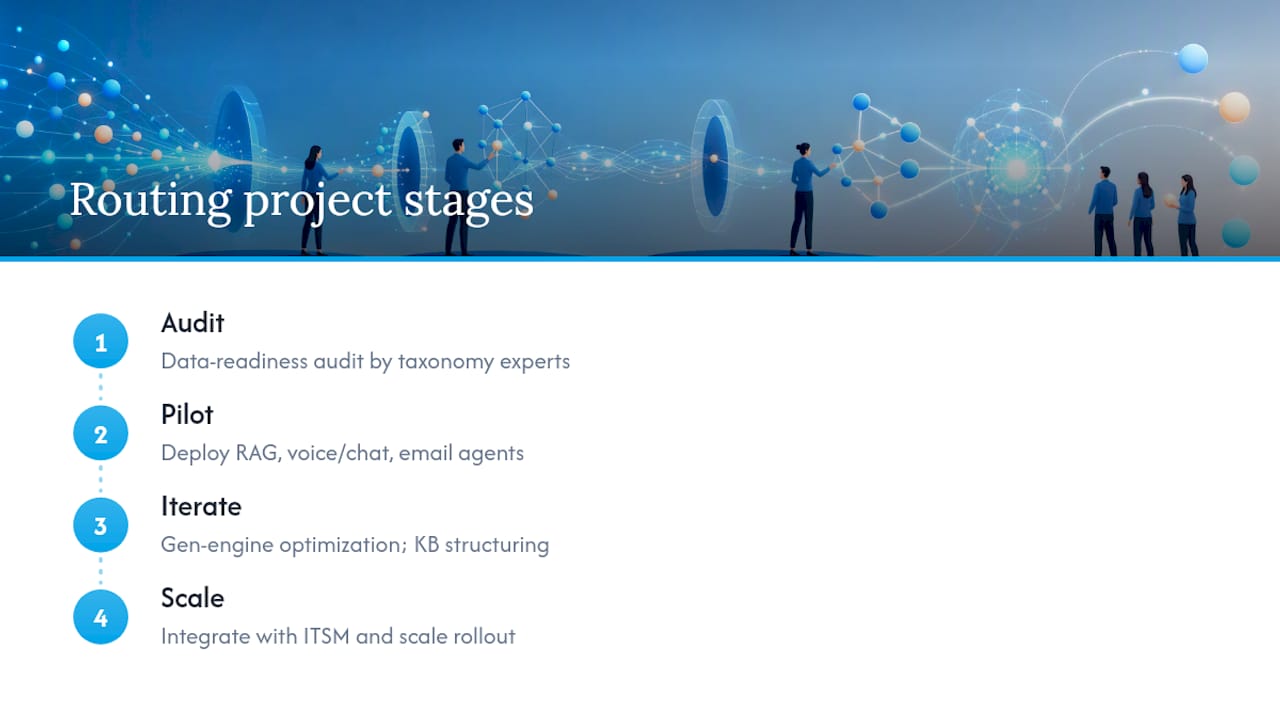
Some consultancies build the components that sit underneath a routing deployment, including RAG systems for context retrieval, voice and chat agents for intake, email agents for triage, and the integration work connecting all of it to an existing ITSM platform. Generative Engine Optimisation work can also help ensure knowledge-base content that context-retrieval layers rely on is structured for easier access by both customers and AI systems.
The typical approach runs audit, then pilot, then iterate, then scale, mirroring the pilot sequence above but with the data-readiness audit done by a team that has seen where taxonomies typically break.
Editor's perspective: triage-only versus triage-plus-autonomous resolution
Favour triage-only if your team is small, your integration timeline is tight, or your governance appetite is low. It's faster to deploy and easier to roll back. Move to triage-plus-autonomy once your misroute rate is already low and your knowledge base is strong enough to support confident auto-resolution. Readiness shows up as clean historical labelling, a stable taxonomy, and a leadership team willing to own the governance overhead. Budget six to nine months before attempting autonomy on top of a triage layer that's still bedding in.
— Oded
Get your ticket routing pilot scoped properly
Most of the ranges quoted above, the wide gap between 40% and 90% faster resolution, come down to integration quality. Real-studios builds the RAG systems, chat and email agents, and platform integrations that determine which end of that range you land on, working directly inside your existing ITSM taxonomy rather than bolting a separate layer on top of it. A service automation build covers the routing logic itself; integration work handles the connection into your existing platform without creating the sync overhead that erodes ROI over time. If your service desk is weighing a pilot, the next step is a scoping conversation covering your current taxonomy, ticket volume, and integration constraints, book one through the Real-studios services page to see what a 90-day pilot would actually look like for your queues.
Sources
- New Research Finds AI in IT Service Management Delivering Measurable Results as Adoption Accelerates Across Industries
- SolarWinds State of ITSM 2025
- AI customer support routing automation statistics 2026 | Stealth Agents
- Gartner research on AI in IT service management