Get a Working Self Hosted LLM Pilot in Days: VRAM, Runtimes, Costs
Self-hosted LLMs suit teams with high, predictable token volumes, sensitive data that cannot leave the building, and enough engineering capacity to run production infrastructure. The core trade-off is control versus operational burden: you gain data ownership and predictable costs, but you inherit GPU procurement, patching, and uptime. If you cannot commit at least half an engineer's time to it, a cloud API or hybrid setup will usually serve you better. The decision checklist below walks through when the maths and the risk profile actually favour bringing the model in-house.
TL;DR:
- Self-hosting is most advantageous for teams with high token volumes, sensitive data, or strict latency requirements that they cannot meet with cloud APIs.
- Running models between 7B and 13B is suitable for mid-range GPUs, while larger models like 34B or 70B+ require professional or data-center hardware, with quantisation reducing VRAM needs.
- Practical deployment involves starting with a pilot on a single GPU, then gradually scaling to full production while monitoring performance and resource usage, with staffing costs often surpassing hardware expenses.
- Choice of runtime like vLLM or TGI impacts throughput and operational effort, and benchmarking with workload-specific tests is essential before deployment.
- Self-hosting costs depend heavily on utilization; underused hardware favors cloud, but high concurrency and efficient resource use make self-hosting more cost-effective when managed properly.
Table of Contents
- When should you self-host instead of using a cloud LLM?
- Which open-weight model should you deploy?
- How much VRAM and memory bandwidth do you actually need?
- Which inference runtime should you use: vLLM, TGI, Ollama, or llama.cpp?
- What does a step-by-step deployment checklist look like?
- What does self-hosting actually cost compared with an API?
- What security and governance controls does self-hosting need?
- How do you keep a self-hosted LLM fast and reliable?
- How does a consultancy typically run this kind of engagement?
- What should you actually do before committing to infrastructure?
- Get a working self-hosted LLM pilot running in days
- Sources
- FAQ
When should you self-host instead of using a cloud LLM?
The decision usually comes down to four factors: volume, data sensitivity, latency, and internal capacity.
- Token volume: teams processing a high and sustained volume of tokens tend to see self-hosting pay off faster than occasional users with low token usage.
- Data sensitivity: healthcare records, legal documents, or financial data with strict residency requirements push firmly towards self-hosting or a private cloud tenancy.
- Latency SLAs: sub-100ms response targets are far easier to hit on infrastructure you control than on a shared multi-tenant API.
- Ops capacity: without someone who can own GPU drivers, model updates, and incident response, self-hosting becomes a liability rather than a saving.
Break-even typically shows up somewhere between moderate and heavy sustained usage, though utilisation and staffing costs shift that line considerably. A common false start is buying hardware before measuring real traffic. Run a hybrid pilot first: route sensitive or high-volume workloads locally while keeping a cloud fallback for burst capacity.
Which open-weight model should you deploy?
Open-weight models like Llama, Mistral, and Qwen now match or approach closed APIs on many structured tasks, though the very best reasoning and multimodal work still often favours closed models with larger training budgets. Before deploying anything commercially, read the licence carefully: some open-weight releases carry usage caps or restrictions on very large deployments, and community licences differ meaningfully from true open-source terms.
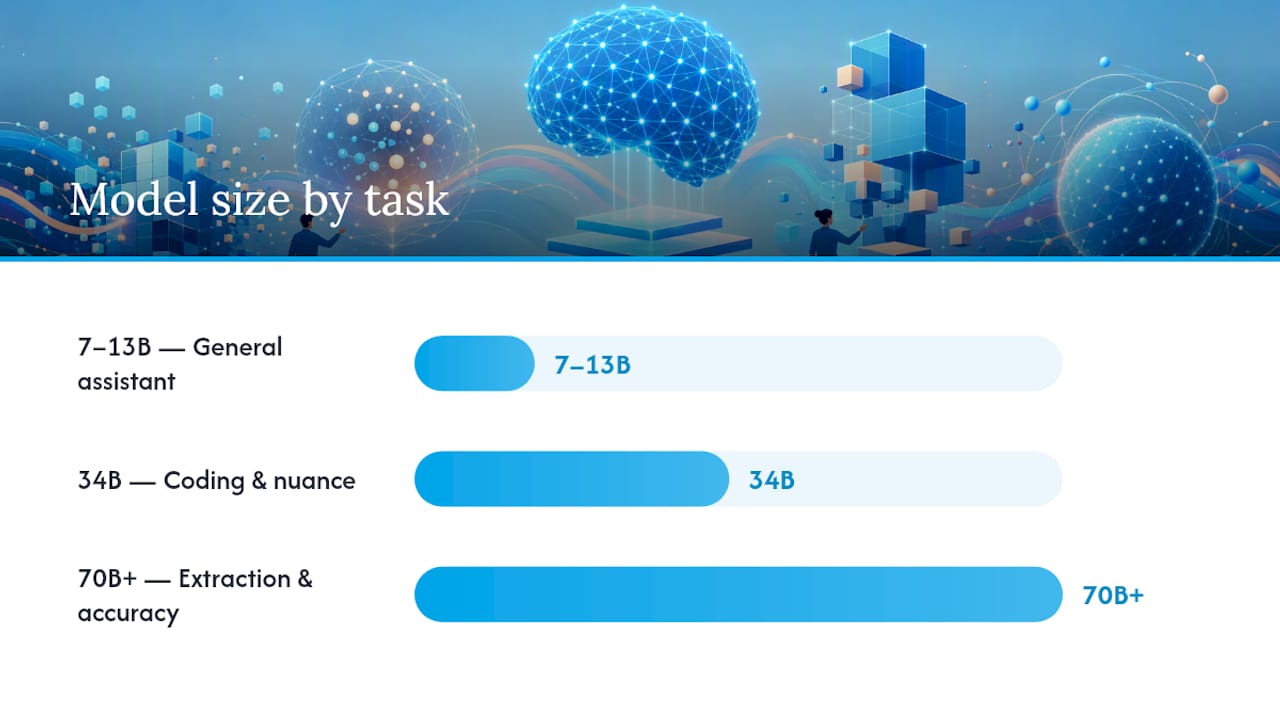
Match model size to the task rather than defaulting to the largest checkpoint you can fit:
- 7B–13B models handle general assistant tasks, summarisation, and simple classification well, and run comfortably on a single mid-range GPU.
- 34B models offer a solid middle ground for coding assistance and more nuanced reasoning.
- 70B+ models suit structured extraction, complex agentic workflows, or tasks where accuracy matters more than latency.
Always benchmark on your own workload rather than trusting leaderboard scores. A model that tops a general benchmark can still underperform on your specific document types or output format.
How much VRAM and memory bandwidth do you actually need?
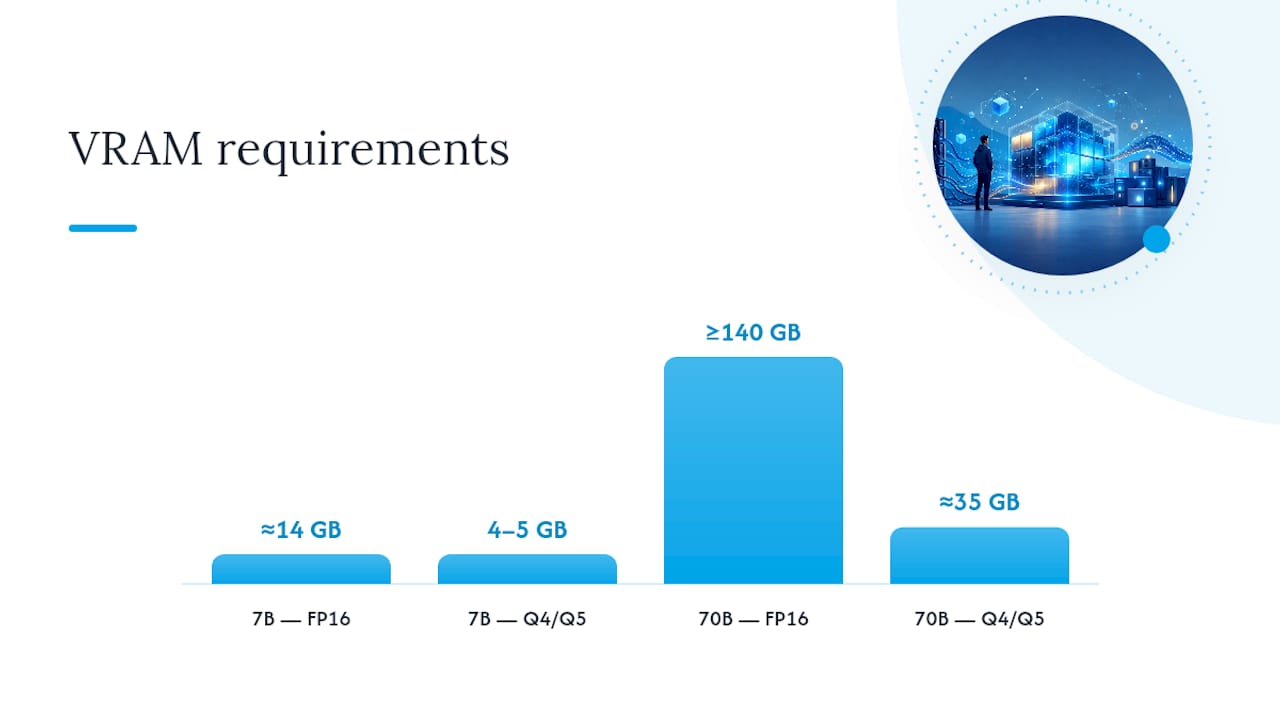
VRAM is the first constraint, but memory bandwidth decides how fast tokens actually stream out. A 7B model in FP16 needs roughly 14GB of VRAM; quantised to Q4, that drops to somewhere around a quarter of that footprint, often 4 to 5GB, with modest quality loss on most tasks. The same ratio broadly holds at larger sizes: a 70B model that needs upwards of 140GB in FP16 can often run on a single high-memory GPU or a dual-GPU setup once quantised to Q4 or Q5.
Bandwidth matters because generation is memory-bound, not compute-bound. Two GPUs with identical VRAM but different bandwidth will show noticeably different tokens-per-second, particularly under concurrent requests.
Rough tiers worth planning around:
- 24GB consumer cards (e.g. RTX 4090 class): comfortable for 7B to 13B models at Q4/Q5, fine for single-user or low-concurrency pilots.
- 48GB professional cards: suitable for medium to large models and aggressive quantisation scenarios.
- 80GB+ data-centre GPUs: typically required for very large models at higher precision or to handle significant concurrent traffic.
Always leave headroom for KV-cache growth as context length and concurrent sessions increase, since it competes with model weights for the same VRAM pool.
Which inference runtime should you use: vLLM, TGI, Ollama, or llama.cpp?
The runtime you pick changes throughput, batching behaviour, and how much operational effort production requires. Practitioner analyses consistently point to vLLM and Text Generation Inference (TGI) as the dominant production choices for throughput-sensitive workloads, largely because both implement continuous batching and efficient KV-cache management that keep GPU utilisation high under concurrent load.
- vLLM: strong throughput via PagedAttention, wide model support, good for teams comfortable managing Kubernetes deployments.
- TGI: Hugging Face's production runtime, tight integration with the model hub, solid choice if your stack already leans on that ecosystem.
- Ollama: the fastest route to a working proof of concept on a laptop or single server, but not built for high-concurrency production traffic.
- llama.cpp: the practical choice for CPU-only or edge deployments where a GPU isn't available.
Whichever runtime you choose, most rely on PyTorch underneath for tensor operations, so driver and CUDA version alignment matters more than people expect. Benchmark throughput, p95 latency, and GPU memory footprint under realistic concurrent load before committing, not just single-request latency.
What does a step-by-step deployment checklist look like?
Deployment should move through three distinct stages, each with its own risk profile and each de-risking the next.
- Proof of concept: run a single model on a single GPU using Ollama or llama.cpp, purely to validate output quality against your actual use case.
- Pilot: move to an instrumented vLLM or TGI deployment with monitoring, a model registry, and canary releases for new checkpoints.
- Production: add redundancy, autoscaling via Kubernetes with the NVIDIA GPU operator, backup routines, and a formal model versioning process.
This staged path mirrors the 5-step deployment pattern many practitioners used to avoid overcommitting hardware before workloads are proven. Budget roughly half to a full-time engineer for the first year to cover patching, monitoring, and model updates.
Pro Tip: Run your pilot for at least two full weeks of real traffic before sizing production hardware. Weekday-weekend and business-hours patterns often shift your peak concurrency numbers more than teams expect.
What does self-hosting actually cost compared with an API?
Self-hosting swaps a variable per-token bill for fixed costs: hardware amortisation, electricity, engineering time, and periodic model updates. That trade only pays off once usage crosses a certain volume threshold, and the break-even point depends heavily on utilisation and staffing overhead rather than hardware price alone.
- Hardware: a single RTX 4090 server amortised over three years, plus electricity for near-continuous operation, typically lands in the low hundreds of pounds per month.
- People: even a fraction of an engineer's time, at typical UK salary bands, usually dwarfs the hardware cost.
- Model updates: budget recurring time for evaluating new checkpoints and re-validating quality, not a one-off setup cost.
Utilisation is the swing factor. A GPU sitting idle 80% of the time makes cloud APIs look far cheaper; the same hardware running near capacity flips that comparison entirely.
What security and governance controls does self-hosting need?
Self-hosting shifts accountability onto your own team, which raises the bar for logging and access control rather than lowering it.
- Audit logging: tamper-evident, append-only logs of prompts, outputs, and access events; treat this as a compliance artefact rather than plain observability.
- Role-based access control (RBAC): separate who can query the model, who can deploy new checkpoints, and who can view raw logs.
- Encryption: at rest and in transit as a baseline, with hardware security modules (HSMs) for key management on regulated workloads.
- RAG safety: input and output filters, policy classifiers, and a human-in-the-loop escalation path for anything flagged as high risk.
Bring legal in early where GDPR or sector-specific rules apply. Self-hosting doesn't remove your compliance obligations; it just moves the enforcement point onto infrastructure you now fully own.
How do you keep a self-hosted LLM fast and reliable?
Quantisation is the first lever most teams pull, and rightly so: it cuts memory and often improves throughput with limited quality loss on many tasks. Test Q4_K_M and Q5_K_M specifically, and validate structured-output tasks separately, since formatting-sensitive outputs degrade differently from free-text generation under quantisation.
- Prefix caching for repeated system prompts and RAG context cuts redundant computation significantly.
- Speculative decoding and request batching queues improve throughput under concurrent load.
- Route requests by model size, sending simple queries to smaller checkpoints automatically.
Monitor GPU memory fragmentation, queue depth, and p95 latency continuously. Silent degradation, where the service still responds but slower, is the failure mode teams miss most often.
Pro Tip: Set an alert on queue depth, not just latency. Latency creeps up gradually as load rises, but queue depth spikes give you a much earlier warning before users notice anything.
How does a consultancy typically run this kind of engagement?
A structured engagement generally runs through four phases: discovery to map data flows and volume, a pilot MVP to prove the model choice, integration into existing systems, and handover with ongoing support.
- RAG systems: connecting the model to internal documents and knowledge bases securely.
- Integrations: linking inference endpoints to CRMs, ticketing tools, or internal APIs, an area covered in more detail on Real-studios's integrations service.
- Automation and GEO: automating downstream workflows once the model is live, and optimising visibility inside AI-driven search results as generative engines change how customers find businesses.
What should you actually do before committing to infrastructure?
Pilot first. Measure real token volumes, latency under load, and how much engineering time patching genuinely consumes, then choose your architecture from that data rather than a vendor's benchmark chart. Teams that prefer a managed route can bring in outside help; the trade-off between control and operational responsibility never disappears, but it does become far easier to price once you have real numbers.
— Oded
Get a working self-hosted LLM pilot running in days
Self-hosting an LLM properly means procurement, quantisation testing, runtime benchmarking, and monitoring, all before a single real user query goes through. A consultancy can offer a fixed-scope engagement that gets a working demo in front of your team in days, not months, with ownership of the result handed to you and support continuing after launch. The AI Agents and Automation & Integration services cover the RAG, voice, chat, and email layers that typically sit on top of a self-hosted model, while AI Engine Optimisation (GEO) makes sure your business still surfaces correctly as customers shift towards AI-driven search.
For teams that want to test the waters before committing to hardware, the Rapid MVPs engagement is built exactly for this: fixed scope, a working demo fast, and a clear read on whether self-hosting is worth the ongoing operational commitment. Get in touch through the services page to scope a pilot.
Sources
For deeper technical detail, consult the PyTorch documentation for framework internals, the Open Source Initiative for licence definitions, and the awesome-llm-services repository for a curated list of self-hostable runtimes and tools. For operational monitoring patterns once your stack is live, Opsphere's guidance on AI-native engineering teams is a useful reference.
- PyTorch
- Self-hosted LLMs in 2026: the complete infrastructure guide
- Self-Hosted LLM: A 5-Step Deployment Guide
FAQ
Can I host my own LLM model?
Yes. Open-weight models like Llama, Mistral, and Qwen can run on your own hardware using runtimes such as vLLM, TGI, Ollama, or llama.cpp, provided you meet the VRAM and licensing requirements for the model you choose.
Which self-hosted LLM is the best?
There is no single best model; 7B to 13B models suit general assistant tasks on modest hardware, while 34B and 70B models suit structured or higher-accuracy work. The right choice depends on testing candidates against your own workload rather than picking from a leaderboard.
What does self-hosted LLM mean?
A self-hosted LLM runs on infrastructure you control, whether on-premise servers or a private cloud tenancy, rather than through a third-party API. You own the deployment, the data flow, and the operational responsibility that comes with it.
Are there LLMs that can be run locally?
Yes, models such as Llama, Mistral, and Qwen are widely run locally using tools like Ollama or llama.cpp, even on a single consumer GPU for smaller checkpoints. Larger models need proportionally more VRAM, but quantisation makes many of them viable on a single high-memory card.