4–6 Week Pilot: Salesforce AI Automation for Architects & Leaders
Agentforce is Salesforce's platform for autonomous, data-connected AI agents that automate context-rich, multi-step workflows across sales, service, and operations. It works best on processes with clear rules but variable inputs, such as case triage or lead qualification, where a fixed flow breaks down but a fully manual process wastes time. The rest of this guide covers the components, architecture patterns, and implementation checklist you need to plan a deployment properly.
TL;DR:
- Salesforce AI automation is most effective for workflows with variable inputs and rules, such as incident triage, lead scoring, and cart recovery.
- Successful deployment depends heavily on clean, up-to-date data, well-structured metadata, and proper permissions before going live.
- Starting with a narrow pilot lasting four to six weeks allows measurable evaluation of containment rate, time savings, and conversion uplift before scaling.
- Ongoing success requires a dedicated centre of excellence, regular performance reviews, and active management of agent configurations and data hygiene.
- Scaling involves adding new agents within existing architectures, with emphasis on maintaining metadata clarity and governance rather than expanding the number of agents indiscriminately.
Table of Contents
- What makes up Salesforce AI automation?
- Where does agentic automation actually pay off?
- What are the core agentic architecture patterns?
- What do you need before you can deploy agents?
- Which workflows should you automate first?
- How do you keep agents running reliably at scale?
- How does a real Agentforce project actually run?
- What does an Agentforce rollout actually cost?
- How do you get staff to actually use the new agents?
- What does a successful rollout look like in practice?
- How should your automation strategy evolve over time?
- What I'd tell any team starting this today
- Where to go for deeper technical reference
- Sources
What makes up Salesforce AI automation?
Salesforce AI automation isn't one product. It's a stack of components that each handle a distinct job, and understanding what each one does is the difference between a coherent build and a mess of disconnected pilots.
- Agentforce is the agent platform itself, built for multi-agent orchestration and natively integrated with Salesforce Customer 360. It's where agents are defined, given topics and actions, and set loose on a workflow.
- Data 360 unifies customer records, transactions, and behavioural signals into a single profile an agent can query in real time, rather than guessing from stale reports.
- Headless 360 strips the interface away so agent logic can be embedded into any channel, be it a mobile app, a kiosk, or a third-party portal, without rebuilding the underlying reasoning.
- MuleSoft connects agents to systems that sit outside Salesforce, using agent facades to reach non-MCP systems so an agent can pull inventory data or trigger an action in an ERP without a custom point-to-point integration, as Salesforce's own architecture guide sets out.
- Einstein Trust Layer sits underneath everything, masking sensitive data before it reaches a large language model and stripping it back out before a response returns, so agents never leak personal or commercial data into a model's training loop.
- Atlas Reasoning Engine is the planning layer, using ensemble retrieval to break a task into smaller steps and pull context from Data 360 before an agent commits to an action.
Metadata flows in one direction and results flow back: Data 360 feeds context to Atlas, Atlas plans the steps, and the agent executes them via Flows, Apex, or direct API calls, with MuleSoft bridging anything outside the Salesforce org. Supported channels currently include web, Slack, Teams, and voice, though some prebuilt templates restrict which channels they'll run on until Salesforce extends coverage.
Where does agentic automation actually pay off?
The value of Salesforce AI automation shows up fastest in workflows that are repetitive but not quite predictable enough for a rigid flow. Here's where teams are seeing real returns:
- Service: incident triage and fulfilment. An agent reads an incoming case, checks the customer's entitlement in Data 360, and either resolves it against a knowledge article or escalates with full context attached, cutting the manual triage step entirely.
- Sales: lead triage and personalised outreach. Instead of a rep working a flat lead list, an agent scores incoming leads against firmographic and behavioural data, then drafts an opening message tailored to the account's actual buying signals.
- Marketing: personalisation at scale. Agents adjust email and web content per segment in near real time, reacting to a browsing session rather than a weekly batch job.
- Commerce: cart and fulfilment recovery. An agent spots an abandoned cart or a delayed shipment, checks stock and delivery data, and proactively messages the customer with a fix, rather than waiting for a complaint.
- Analytics: automated insight and alerting. Agents monitor pipeline or service metrics continuously and flag anomalies (a spike in churn risk, a stalled deal) to the right person before it becomes a quarterly surprise.
The metrics worth tracking during a pilot are containment rate (how many cases an agent resolves without human escalation), time saved per resolved case, and conversion uplift on agent-touched leads versus a control group. None of these need a sophisticated dashboard to start. A simple before-and-after comparison on a single queue, run over four to six weeks, tells you more than a theoretical ROI model ever will.
What are the core agentic architecture patterns?
Architects building agent systems on Salesforce work with a small set of repeatable patterns, and picking the right one for each job matters more than the number of agents you deploy.
- Orchestrator agents sit at the top, coordinating specialist agents and aggregating their outputs into a single coherent response for the end user.
- Specialist (worker) agents handle one narrow domain well, such as billing queries or shipping status, and hand control back to the orchestrator once done.
- Utility agents perform a single reusable function (a lookup, a calculation, a data transformation) that other agents call on repeatedly.
- Long-running agents manage processes that span hours or days, such as a multi-stage approval, checkpointing their state between steps rather than running end to end in one pass.
Salesforce's enterprise architecture guidance frames this as separating responsibilities across orchestrator, worker, and utility roles while planning for single-org, multi-org, or multi-vendor orchestration archetypes, which keeps governance intact as the system scales. Two protocols underpin how agents talk to each other and to the outside world. Model Context Protocol (MCP) standardises how an agent requests and receives context from external systems, while Agent-to-Agent (A2A) handshake protocols let separate agents, even ones built by different vendors, exchange tasks and results in a governed way.
Underneath all of this, the Atlas Reasoning Engine uses ensemble retrieval-augmented generation to plan multi-step tasks, breaking a broad request into smaller, evaluable steps rather than answering in one uncontrolled pass, as Salesforce explains. Practically, this means an architect defines discrete sub-agent topics and actions rather than building one agent that tries to do everything.
Pro Tip: Design your first orchestrator with no more than three specialist agents underneath it. Systems with a dozen loosely defined specialists from day one are almost impossible to debug when something goes wrong.
What do you need before you can deploy agents?
Deployment readiness comes down to four areas, and skipping any one of them is the most common reason a pilot stalls.
- Data readiness. Unified customer profiles, a current knowledge base, an accurate configuration management database (CMDB), and clean catalogue mappings all need to exist before an agent can reason about them reliably.
- Metadata and flow mapping. Every sub-agent needs its topics and actions explicitly defined and exposed, since Atlas Reasoning Engine's design depends on well-structured metadata rather than one monolithic agent guessing at intent.
- Permissions and enablement. Einstein Generative AI needs enabling at the org level, and for service use cases specifically, the required setup includes deploying a data kit and confirming SLA and knowledge-article data are present.
- Channel and testing constraints. Some prebuilt IT service templates are currently limited to specific channels such as portal, Slack, or Teams, so confirm channel support before promising a rollout date to stakeholders.
Statistic callout: Salesforce's own setup documentation for IT service agents specifies that the data kit, CMDB entries, and knowledge articles must all be in place before an agent can be enabled, which means data cleanup is not an optional pre-step; it's a hard prerequisite the platform checks for.
Which workflows should you automate first?
Not every process deserves an agent. A workflow is ready for agentic automation when it has clean, structured data behind it, a somewhat predictable but not fully rigid decision path, enough historical volume to observe patterns, and a KPI you can actually measure week to week.
- Favour agentic automation when a task has variable inputs and requires judgement, such as interpreting a customer's free-text complaint.
- Favour deterministic flows (standard Salesforce Flow or Apex) when the logic is genuinely fixed, such as routing a case by region.
- Avoid automating a process you can't yet observe well. If you don't have baseline metrics today, you won't be able to prove the agent improved anything.
The safest path is pilot, measure, scale, in that order. Pick one queue or one segment, run it for four to six weeks against a control group, and only expand once the containment rate and time savings are proven. Teams that automate everything at once tend to over-automate the wrong processes and spend the following quarter unwinding them.
How do you keep agents running reliably at scale?
Running agents in production is an operating problem as much as a technical one. Most organisations that scale successfully build a Centre of Excellence (CoE) with a clear cadence: weekly operational reviews to catch performance drift, and monthly strategic reviews to decide what gets built next.
- Track containment rate, escalation rate, and response latency as your core observability metrics, logged per agent and per topic.
- Maintain a tech-debt register specifically for agent configurations, since outdated topics and stale actions accumulate quickly as the platform's capabilities change.
- Set up closed-loop retraining, where flagged failures feed back into refining an agent's instructions and actions rather than sitting in a log nobody reviews.
- Apply policy-as-code for guardrails, so permission and data-access rules are version-controlled rather than configured once and forgotten.
A faster CoE cadence than traditional IT governance is not optional given how quickly Agentforce's own feature set changes; a review cycle built for annual software upgrades will not catch a monthly model update.
Pro Tip: Assign one person on the CoE the specific job of reading Salesforce's release notes for Agentforce and Data 360 every cycle. Feature drift is the single most common cause of a working agent quietly breaking.
How does a real Agentforce project actually run?
A typical AI automation engagement moves through five phases, and none of them can be skipped without risking rework later.
- Discovery. Map the target workflow, its data sources, and its current failure points before touching any configuration.
- Data kit preparation. Clean up CMDB entries, knowledge articles, and catalogue mappings, since this is where most delays happen.
- Prototype. Build a single orchestrator with one or two specialist agents against a narrow slice of real data.
- Pilot. Run the prototype live against a control group for several weeks, measuring containment and time saved.
- Scale. Extend to additional queues or channels once the pilot metrics hold up.
Common technical fixes at this stage include tidying metadata that Atlas Reasoning misreads, remapping sub-agent topics that overlap, and building MuleSoft integrations to reach systems outside Salesforce. Generative Engine Optimisation (GEO) matters here too: as customers increasingly ask AI assistants for recommendations rather than searching Google directly, how your business is described and structured across the web affects whether an AI engine surfaces you at all.
What does an Agentforce rollout actually cost?
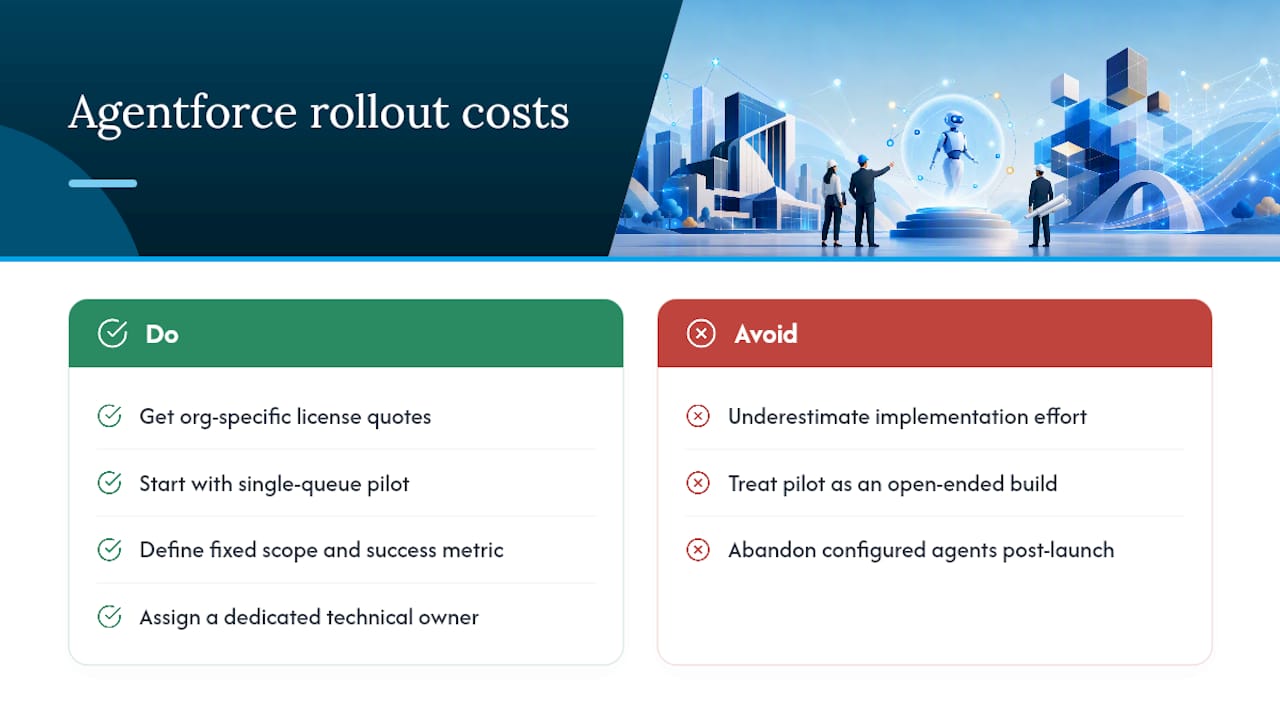
Cost planning for Salesforce AI automation splits into three buckets: licensing, implementation, and ongoing operation, and most budget overruns come from underestimating the middle one.
Licensing costs depend on your existing Salesforce edition and which Agentforce and Data 360 add-ons you need, so get a quote specific to your org rather than budgeting from a generic price list. Implementation is usually the larger line item for a first deployment, covering data cleanup, metadata mapping, sub-agent design, and integration work through MuleSoft where systems sit outside Salesforce. A narrow pilot on a single queue is far cheaper to scope than a full multi-department rollout, and it's the sensible place to start regardless of budget size.
Ongoing costs include CoE staffing time, model monitoring, and periodic retraining or reconfiguration as Salesforce updates Agentforce's capabilities. Resource planning should account for at least one dedicated technical owner post-launch. Agents that are configured and abandoned degrade quickly as data drifts and business rules change underneath them.
For budgeting purposes, it helps to treat the first pilot as a fixed-scope project with a defined success metric, rather than an open-ended build. Real-studios structures engagements this way specifically so a client can see the cost of proving value before committing to a larger automation programme, which keeps the financial risk contained to a single queue or workflow while the wider case for scaling gets built on real numbers rather than projections.
How do you get staff to actually use the new agents?
Adoption fails more often from poor change management than from poor technology. Staff who feel an agent is watching them, rather than helping them, will quietly work around it.
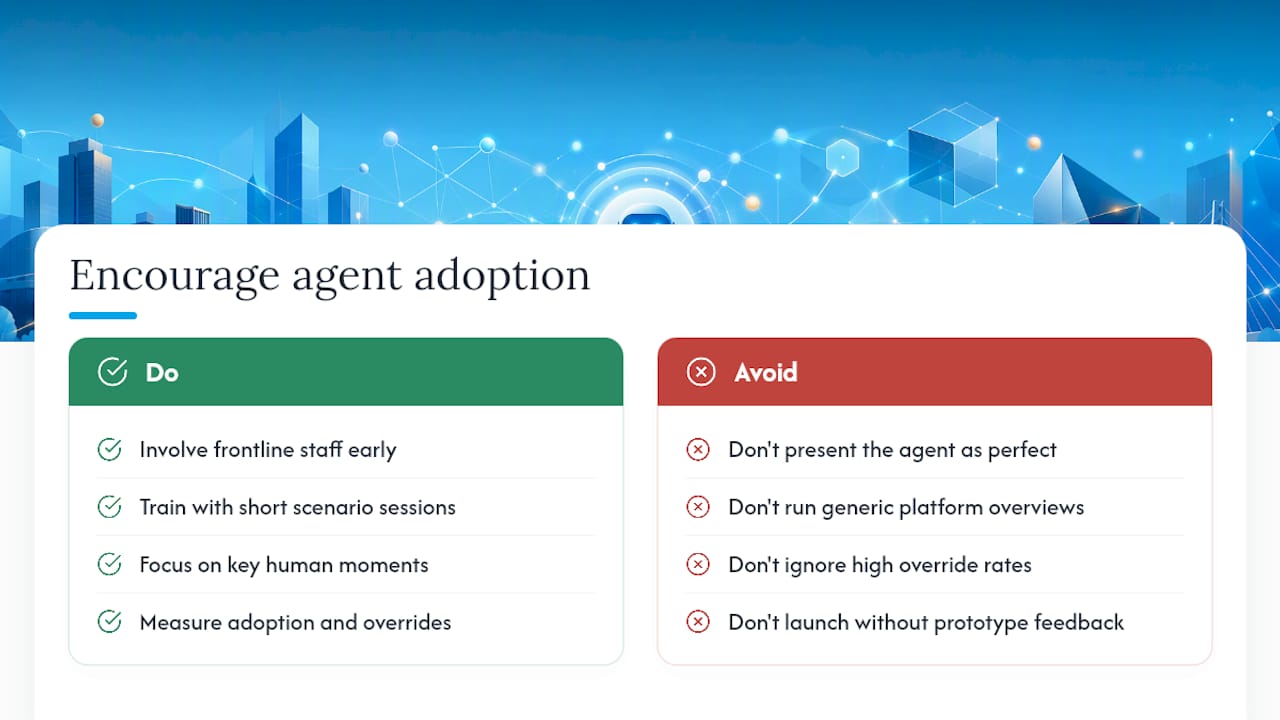
Training needs to focus on the handful of moments where a human still matters: reviewing an escalation an agent flagged, correcting a wrong classification, or overriding an automated response. Keep training sessions short and scenario-based rather than a generic platform overview; a service agent learning to trust an Agentforce triage decision needs to see it get five real cases right before they'll rely on it.
Change management works best when the team using the tool helped shape it. Involve frontline staff in defining what "good" looks like for an agent's output during the prototype phase, not after it's live. This also surfaces edge cases the technical team missed, since the person handling a queue daily knows its quirks better than any architect.
Communicate what the agent will and won't do explicitly, and be honest that early versions will make mistakes. Teams that are told to expect a perfect system disengage the first time it isn't; teams told to expect a system that improves with feedback stay engaged through the rough weeks. Measure adoption itself, not just automation output. Track how often staff override or ignore agent suggestions. A high override rate is a signal the agent's logic doesn't match how the team actually works, and it needs revisiting before you expand its scope.
What does a successful rollout look like in practice?
The pattern across successful Agentforce deployments is consistent: start narrow, measure honestly, and only expand once the numbers hold. A service team that pilots agentic triage on a single support queue, for instance, can typically see cases resolved without escalation rise within weeks, simply because the agent has clean knowledge articles and CMDB data to work from day one, exactly the prerequisite Salesforce's own setup guidance specifies.
Sales teams running lead-triage pilots tend to see the clearest early win in rep time saved rather than raw conversion, since an agent pre-qualifying and drafting outreach frees reps to spend more time on the calls that matter. Commerce teams automating cart recovery often find the agent catches issues (a delayed shipment, a stock mismatch) that would otherwise only surface as a complaint days later.
What separates the deployments that stick from the ones that stall isn't the sophistication of the agent. It's whether the underlying data was actually ready before launch, and whether someone owned the agent's performance after go-live rather than treating the pilot as a one-off project. Agentforce's prebuilt templates and AgentExchange partner assets genuinely speed up the build phase, but they don't substitute for clean CMDB entries or a properly mapped sub-agent topic.
How should your automation strategy evolve over time?
Scalability in Salesforce AI automation isn't about adding more agents. It's about whether your architecture and governance can absorb more agents without breaking down.
An orchestrator built for three specialist agents can usually absorb a fourth or fifth without redesign, provided the metadata and topic definitions stayed clean from the start. Beyond that, most organisations need to introduce a second orchestration tier, splitting responsibilities by department or by orchestration archetype (single-org versus multi-org) rather than letting one orchestrator sprawl across every function, which is exactly the kind of layered design Salesforce's agentic enterprise architecture recommends for organisations moving past a first pilot.
Business needs shift faster than most teams expect once agents are live. A product launch, a new region, or a merger can all demand new sub-agents or entirely new orchestration paths within months. Building your CoE's tech-debt register and observability metrics early means these changes slot into an existing review cycle rather than triggering a scramble.
The organisations that scale well treat every new use case as a variant of an existing pattern (another specialist agent under the same orchestrator, another workflow through the same data kit) rather than a bespoke build each time. That discipline is what keeps a five-agent system as manageable as a fifty-agent one.
What I'd tell any team starting this today
Three things separate the Agentforce deployments that work from the ones that quietly get abandoned six months in. First, data hygiene isn't a nice-to-have step before launch, it's the actual project. Teams that treat CMDB and knowledge-base cleanup as a formality end up debugging an agent that was never given the material to succeed. Second, start with one narrow pilot and resist the pressure to automate three departments simultaneously. Third, invest in observability before you need it. By the time an agent is misbehaving in production, you want logs already in place, not a scramble to add them.
The one warning I'd underline: technical debt and slow governance kill more agent programmes than bad models ever do. An agent that isn't reviewed monthly drifts quietly away from what the business actually needs, and nobody notices until it's already causing damage.
— Oded
Where to go for deeper technical reference
For hands-on implementation detail, start with Salesforce's agentic architecture and design patterns guide, the Agentforce IT services setup documentation, and Salesforce's Centre of Excellence guidance for AI governance. Broader context on agentic AI's business impact is covered in this industry piece on agentic automation.
If you're weighing up whether to run a pilot in-house or bring in a partner to accelerate the build, Real-studios works with UK businesses on exactly this kind of Agentforce automation and agent implementation, from data readiness through to a scaled, governed rollout.
Sources
- Enterprise Agentic Architecture and Design Patterns | Agentforce | Fundamentals | Salesforce Developers
- How does Agentforce work? | Salesforce
- Set up Agentforce for IT services | Salesforce Help