Five Stage PDF Extraction AI Pipeline for UK Teams That Cuts Review
The reliable method for extracting structured data from PDFs is a pipeline that combines layout-aware parsing, deterministic extraction and constrained LLM outputs, checked by schema validation and a human review queue. Real-studios builds exactly these pipelines for UK businesses moving off manual data entry.
TL;DR:
- Using a pipeline approach with layout-aware parsing, deterministic extraction, and schema validation reduces errors caused by generalist LLMs alone.
- Cost-effective choices depend on volume: from GPT-4o for under 5,000 pages monthly to API layout models for medium predictability, with data hosting and compliance considerations influencing vendor selection.
- Table extraction remains challenging due to the need for accurate detection and recognition; hybrid methods with rule-based detection and LLM fallback significantly outperform pure rule-based tools.
- Common extraction failures stem from scanned pages, multi-column layouts, template drift, cross-page tables, and handwriting, all requiring specific fixes like OCR, explicit reading order, or human review.
- Building an effective production pipeline demands stratified evaluation samples, field-level accuracy monitoring, and ongoing validation to catch template changes, with external services offering quick, tailored deployment options.
Table of Contents
- What is the pipeline-first approach to PDF data extraction AI?
- How do you choose between OCR, layout parsers and vision models?
- Why is table extraction still the hardest part of PDF parsing?
- What causes PDF extraction to fail, and how do you fix it?
- How do you prove a PDF extraction pipeline is production ready?
- Should you build PDF extraction in-house or hire a specialist?
- Real-studios: services and how to get started
- Sources
What is the pipeline-first approach to PDF data extraction AI?
Most failed PDF projects share one root cause: someone bolted a single large language model onto the problem and hoped it would generalise. It doesn't. A production system needs distinct stages, each with its own job and its own failure mode to guard against.
The pattern that holds up under real document volume looks like this:
- Parse — Layout-aware parsers handle digital PDFs directly, reading text position, font weight and table boundaries rather than treating the page as one long string. Scanned pages get flagged early and routed to OCR before anything else happens to them.
- Classify — Every document gets matched to the correct schema before extraction starts. Skip this step and you risk pulling invoice fields out of a delivery note, which produces confident, wrong answers.
- Extract — Deterministic parsers do the heavy lifting wherever the layout is predictable. LLMs and vision-language models step in only for ambiguous regions, free text, or documents that break the expected template.
- Validate — Outputs get constrained against a schema: ISO 8601 dates, ISO 4217 currency codes, numeric ranges. Cross-field checks catch the kind of error a single-field validator misses, such as a line-item total that doesn't sum to the invoice total.
- Review — Human-in-the-loop (HITL) queues catch what automation shouldn't be trusted with. Confidence thresholds around a typical range per field are a sensible starting gate, and a well-tuned pipeline should send only a small fraction of documents to a human reviewer.
This five-stage structure is now the standard architecture recommended for document extraction moving from PDF chaos to clean JSON, and for good reason. Each stage isolates a specific risk instead of asking one model to absorb all of them.
Pro Tip: Log every field's confidence score, not just the document-level score. Field-level thresholds catch what document-level averages hide.
How do you choose between OCR, layout parsers and vision models?
The right stack depends on volume and document variety, not on which tool is newest. Getting this choice wrong is the single most common reason PDF data extraction AI projects blow their budget.
- Under roughly 5,000 pages a month, a vision-capable LLM like GPT-4o is practical. The per-page cost is higher, but engineering overhead stays low, which matters when volume doesn't justify a dedicated pipeline.
- Between 5,000 and 200,000 pages a month with predictable form structures, API-first layout models such as Azure Document Intelligence tend to win on cost and consistency.
- Structured forms with fixed layouts favour LayoutLM-style models trained on positional data.
- Variable or inconsistent layouts favour Donut-style or vision LLM approaches, often blended into a hybrid pipeline rather than used alone.
- Hosting and compliance matter as much as accuracy. Check where a vendor processes and retains data, and ask about their ISO 27001 or SOC 2 posture before signing anything, particularly if the documents contain personal or financial data.
Cost curves also shift with scale. A cloud API charging per page looks cheap at low volume and expensive at high volume, whereas a self-hosted layout parser has the inverse curve: higher fixed engineering cost, near-zero marginal cost per document. Model the twelve-month total, not the sticker price on page one.
Why is table extraction still the hardest part of PDF parsing?
Extracting a table correctly requires two separate skills that most tools conflate: table detection (TD), which finds where a table sits on the page, and table structure recognition (TSR), which works out which cell belongs to which row and column. A tool can nail one and fail the other.
- Rule-based tools like Camelot handle clean, gridded tables well but struggle with merged cells or inconsistent borders.
- Hybrid pipelines that pair rule-based detection with layout-aware parsing and an LLM fallback for ambiguous cells consistently outperform either approach alone.
- Multi-page tables need explicit stitching logic: matching header keys across page breaks and discarding duplicated header rows rather than treating each page as a separate table.
In tests combining a Camelot-based pipeline with an LLM fallback, exact match and Levenshtein similarity scores reached 0.99 to 1.00 on tabular PDF extraction benchmarks. That's a meaningful gap over rule-based extraction alone, which drops sharply on irregular tables. Treat anything below roughly 0.95 exact match on your own stratified sample as a signal to add human review, not a number to ignore.
What causes PDF extraction to fail, and how do you fix it?
Most failures trace back to five predictable causes, each with a specific fix.
- Scanned pages misread as digital text. Check character density per page before extraction; anything suspiciously sparse or garbled routes to OCR. Aim for a character error rate (CER) under 3% before extraction begins, since above 5% the recognition errors compound into extraction errors that no downstream validation can catch.
- Multi-column layouts read out of order. Layout-aware parsing fixes most of this, but test reading order explicitly against a stratified sample of real documents rather than trusting the parser's default.
- Template drift. Suppliers change invoice layouts without warning. Monitor extraction confidence over time, label a fresh sample quickly when accuracy dips, and let schema validation flag the drift before it reaches production data.
- Cross-page tables getting split or duplicated. Header-key matching across page boundaries prevents duplicate rows.
- Handwriting, checkmarks and signatures. Route these regions to a vision LLM or a human reviewer rather than forcing a text parser to guess.
Pro Tip: Build your test sample before you build your pipeline. A stratified set covering your worst scan quality, your most inconsistent supplier, and your oldest template drift will expose problems that a clean sample never will.
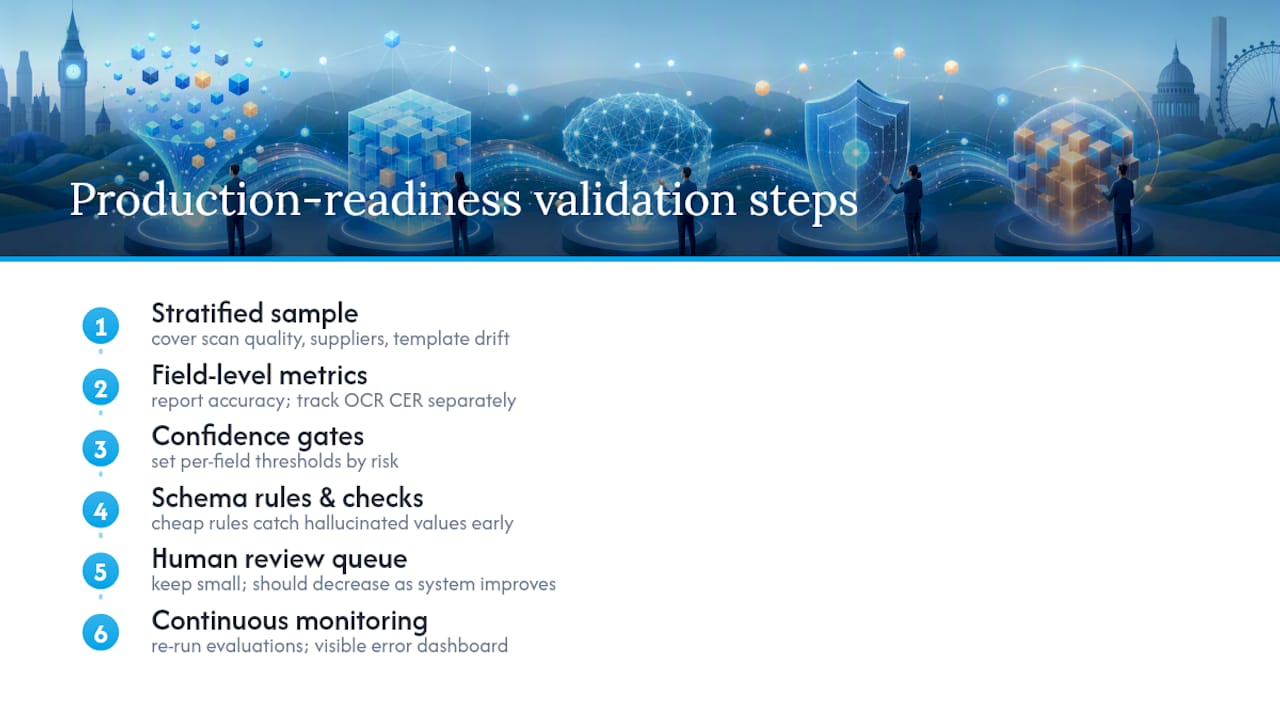
How do you prove a PDF extraction pipeline is production ready?
Accuracy claims mean nothing without a benchmark that reflects your actual document mix. A stratified evaluation sample covering varied scan quality, multiple suppliers and known template drift will reveal failure rates that a clean, homogeneous test set hides entirely. This matters because vendors love to quote accuracy on their easiest documents.
Validation is the highest-return stage in the entire pipeline. Cheap schema rules and cross-field checks catch most hallucinated values before they ever reach a person, which means the human queue only sees the cases that genuinely need judgment.
Report accuracy at the field level, not just per document, and track character error rate on OCR'd pages separately from digital-native ones. Set confidence gates per field type, since different fields carry different risks if incorrect. A well-tuned pipeline should push only a small fraction of documents into human review, and that percentage should decrease as the system improves as the schema and training examples mature.
Continuous monitoring matters as much as the initial build. Re-run evaluations periodically against fresh samples, keep an error dashboard visible to whoever owns the pipeline, and treat a rising review queue as an early warning that something upstream, a supplier's new invoice format, most often, has changed. Teams building these pipelines commercially, including Real-studios, typically run this evaluation cycle as a standing part of the engagement rather than a one-off audit.
Should you build PDF extraction in-house or hire a specialist?
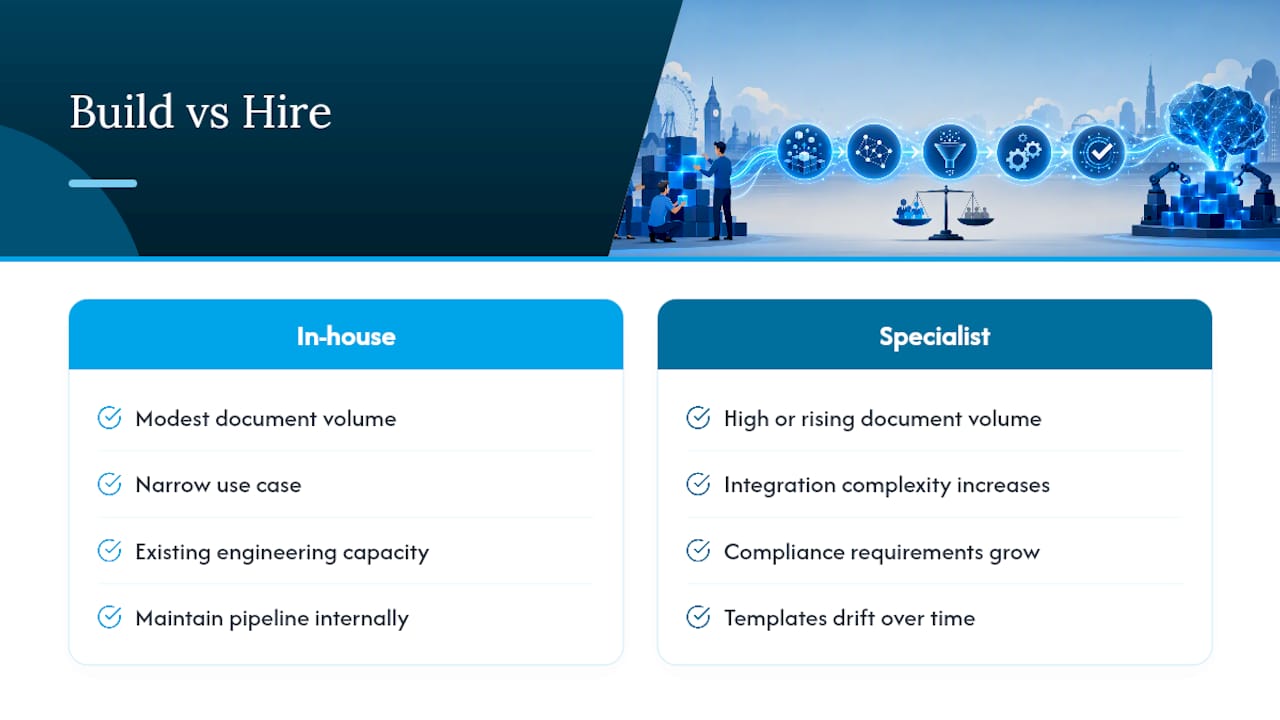
Build in-house if your volume is modest, your use case is narrow, and you already have engineering capacity to maintain a pipeline. Hire a specialist once integration complexity, compliance requirements, or document volume start climbing, since those are the exact areas where in-house pipelines quietly rot. A typical engagement runs discovery, then a pilot on real documents, then production rollout, then ongoing support as templates drift.
Real-studios: services and how to get started
Real-studios is the alternative to hiring an in-house data engineering team for PDF extraction, without the months of build time before you see a working pipeline. Instead of assembling OCR, layout parsing and validation logic from scratch, you get a production-ready system scoped to your documents, your schema and your compliance requirements.
The Service Automations team builds the extraction and validation pipeline itself, from parsing through to the human review queue. The Service Integrations team connects that output to your ERP, CRM, or analytics stack, so extracted data lands where your business actually uses it rather than sitting in a CSV. For teams that want to test the approach before committing to full production, the AI studio offering scopes a pilot against your own document set.
If you're weighing whether to build or hire, the practical next step is a short audit of your current documents and volume. Request a pilot scope from Real-studios and get a concrete estimate before you commit engineering time.