What is Gmail AI automation and how does it actually work?
Gmail AI automation, in the enterprise sense, is a custom-built agent that reads, classifies, and acts on inbound email using the Gmail API, OAuth2, and a reasoning layer that calls internal tools. This is not a consumer inbox feature. It is a deployed system, built and handed over by a consultancy such as Real-studios, that connects to your CRM, calendar, and ticketing systems to do real operational work.
A working agent typically covers two capability bands:
- Triage and classification: sorting, prioritising, and summarising inbound mail against rules your team defines.
- Draft-and-approve or automated action: drafting replies, creating CRM leads, scheduling meetings, or escalating to a human, depending on the sensitivity of the category.
A well-run pilot should produce measurable triage accuracy and time-saved figures within weeks, and the build is not finished until you receive full handover documentation covering workflows, triggers, credentials, and escalation paths.
Key Takeaways
A production Gmail AI agent succeeds when it combines least-privilege OAuth scopes, staged autonomy, typed tools, and full handover documentation delivered by a consultancy that builds and deploys, not just advises.
| Point | Details |
|---|---|
| Match automation level to risk | Start triage-only or draft-and-approve for sensitive categories; reserve autonomous send for low-risk, high-volume mail. |
| Use Gmail API and Watch | Prefer event-driven push notifications over IMAP/SMTP polling for real-time reliability. |
| Start with read-only scope | Begin with gmail.readonly, upgrading to gmail.modify only once accuracy is proven. |
| Budget realistic timelines | Simple workflows run 6 to 12 weeks; complex multi-integration agents run 12 to 16 weeks. |
| Demand handover documentation | Insist on workflows, triggers, credentials, and escalation paths before accepting delivery. |
| Choose a build-first partner | Real-studios delivers deployed Gmail agents with ongoing support, not advisory-only engagements. |
Table of Contents
- Levels of Gmail AI automation and which fits your organisation
- Essential architecture and integrations for a Gmail AI agent
- Security, governance and permission model for email agents
- How long does a Gmail AI automation pilot take?
- What to expect from a consultancy and how to scope a Gmail agent project
- Why treat your Gmail agent as a team member, not a tool
- Get your Gmail AI agent built and deployed by Real Studios
- Sources
Levels of Gmail AI automation and which fits your organisation
Every deployment sits on a spectrum, and picking the wrong point on it is the most common reason pilots stall.
- Triage-only. The agent classifies and prioritises but never writes or sends. Fits legal, finance, or any inbox where a wrong reply carries real cost.
- Draft-and-approve. The agent writes a reply or action and a human clicks send. Fits sales enquiries, support tickets, and recruitment screening, where speed matters but tone and accuracy still need a check.
- Autonomous send. The agent acts without review for narrow, low-risk categories, such as meeting confirmations or newsletter unsubscribes.
Compliance exposure rises sharply from level 1 to level 3, so most organisations pilot conservatively on one category, then expand once triage accuracy holds steady.
Pro Tip: Decide the starting level by multiplying sensitivity by volume. High-volume, low-sensitivity categories (order confirmations, FAQ replies) are the fastest route to autonomous send. Low-volume, high-sensitivity categories (legal notices, executive correspondence) should stay in draft-and-approve indefinitely.
Essential architecture and integrations for a Gmail AI agent
Feasibility and cost both hinge on architecture decisions made before a single line of code is written.

The preferred connector is the Gmail API with OAuth2, paired with Gmail Watch for event-driven push notifications rather than constant polling. Production email AI agents integrate natively with Google Workspace this way, giving near-real-time triggering. IMAP/SMTP remains a fallback for legacy setups, but it lacks the same push reliability and adds latency.
Beyond the connector, a robust agent needs:
- Classification and retrieval (RAG) to pull sender history, CRM records, and related documents into context.
- A reasoning loop that decides what to do with that context.
- Typed tools with explicit scopes, such as
draft_reply,create_crm_lead,schedule_meeting, andescalate, so the agent can only call functions it's been granted access to. - State and memory, usually a vector store for context plus a transactional database for workflow state, with logging for every decision the agent makes.
Before scoping a build, map your connector matrix against CRM, calendar, and ticketing platforms. A missing connector discovered mid-build is one of the most common causes of scope creep and budget overrun, because it forces custom integration work nobody priced in.
Security, governance and permission model for email agents
Security architecture is not a bolt-on. It shapes what the agent is even allowed to attempt.
Start with least-privilege OAuth scopes: gmail.readonly for observation, upgrading to gmail.modify only once the agent has proven reliable in draft mode. Tech for All's guidance on setting up email agents backs this progression, and org-wide deployment should require explicit admin consent rather than individual user approval.
From there, insist on:
- Typed tools and allow lists that cap what the agent can do per category, so
send_emailis only exposed to pre-approved low-risk workflows. - Human-in-loop escalation gates for anything outside those approved categories.
- Audit logging and retention covering every action the agent takes, with monitoring thresholds that flag anomalies.
- Vendor security posture, including SOC 2 or equivalent, and clear data residency terms if UK data protection obligations apply to your inbox content.
Pro Tip: Never let a vendor connect via shared credentials. OAuth2 or SSO should be the only connection method, and read-only access should be the default until the agent earns broader scope through demonstrated accuracy.
How long does a Gmail AI automation pilot take?
A realistic pilot follows staged autonomy, not a single flip of the switch.
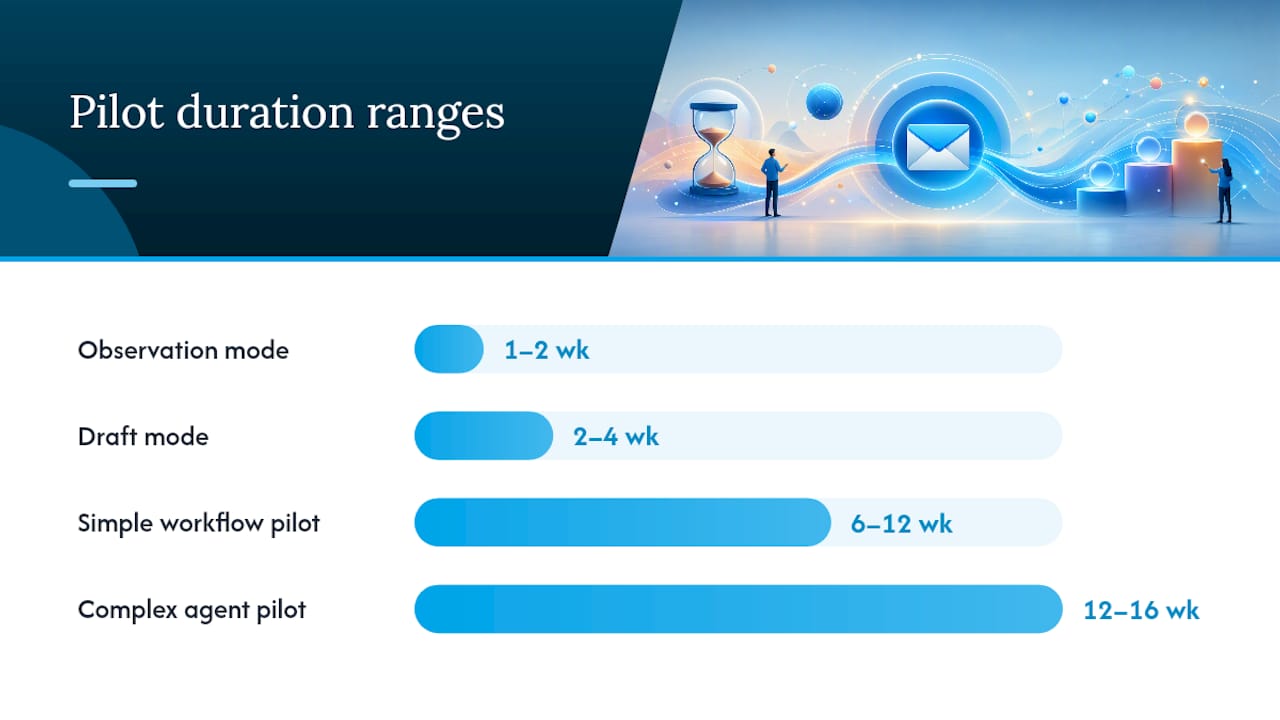
- Weeks 1 to 2: observation mode. The agent reads and classifies but takes no action, building a baseline for triage accuracy.
- Weeks 2 to 4: draft mode. The agent proposes replies and actions; humans approve or reject, generating accept-rate data.
- Weeks 4 onwards: staged autonomy. Low-risk categories move to autonomous send once accuracy holds.
Simple workflows typically run 6 to 12 weeks end to end, while complex agents with multiple integrations run 12 to 16 weeks. Judge success against triage accuracy, draft accept rate, time saved per user per day, and the number of incidents requiring escalation.
Measurable ROI often appears within a few weeks to a few months depending on complexity., though most teams should expect a 60 to 90 day stabilisation period before a complex automation runs without regular intervention. That stabilisation window is where handover documentation earns its value, because your team needs to operate the system, not just watch it work.
What to expect from a consultancy and how to scope a Gmail agent project
A proposal worth signing includes a working agent, not a deck. A consultant should be able to demonstrate deployed systems in a live client environment, with a clear rationale for each connector and tool choice against your actual email volume.
Expect these deliverables:
- A functioning agent, tested against your inbox categories.
- Written rationale for tool and connector choices, matched to volume and logic complexity.
- A test plan with acceptance criteria you agreed upfront.
- Full handover documentation: workflows, triggers, credentials, and escalation paths, so your team can run the system without ongoing vendor dependence.
You will need to commit resources too: inbox access, CRM field mapping, defined escalation criteria, and agreed acceptance tests before go-live.
Pro Tip: Treat a promised timeline under four weeks for a multi-integration agent as a red flag, alongside advisory-only engagements and single-tool bias where every recommendation happens to favour one platform regardless of your actual volume. Ongoing support should be structured as a change-control process, not an open-ended retainer with no defined scope.
Why treat your Gmail agent as a team member, not a tool
Deloitte's framing of AI agents as team members rather than accelerants changes how you should scope one. A tool speeds up a task a human still owns. A team member owns the task itself, with defined responsibilities, escalation paths, and performance metrics, exactly like a new hire.
That reframing matters because most failed pilots treat the agent as a productivity add-on and skip the operational planning a real hire would get: clear job description, defined authority, review cadence. Real Studios builds agents with that operational discipline from day one, including handover documentation and escalation rules that let internal teams manage the system independently.
A useful comparison point for build-first delivery models is Monobot's work on workflow automation agents, which reinforces the same principle: proven build capability matters more than the sophistication of the sales pitch.
— Oded
Get your Gmail AI agent built and deployed by Real Studios
Real-studios builds, deploys, and hands over custom Gmail AI agents, not slide decks. That means a working system in your inbox with full handover documentation, ongoing support, and Generative Engine Optimisation built in, so your business stays visible as customer research shifts from search engines to AI assistants.
If you are weighing a bespoke build against a generic automation platform, the difference shows up at handover: you get triggers, credentials, and escalation paths documented, not a black box you rent indefinitely. Book a pilot conversation through the Service Automations page and scope a triage-only or draft-and-approve pilot against one email category first. For businesses needing deeper connections into CRM, calendar, or ticketing systems, the Service Integrations page covers what that technical groundwork involves.
Sources
- How to set up an AI agent for email management - Tech for All
- Navigating the different AI assistants and agents | Deloitte