Six steps to prevent accuracy collapse in Document AI for research teams
Data extraction AI converts unstructured documents such as PDFs, scans and forms into structured, validated fields that other systems can use. It differs from OCR, which only reads characters. The main benefit is reliable, auditable input for analytics, RAG systems and downstream software. Accuracy still varies by document complexity, so validation and human review remain necessary.
TL;DR:
- Data extraction AI is more reliable than OCR in complex documents, but accuracy declines with increasing schema size and document length.
- Schema-guided extraction and visual grounding are essential to ensure accurate, auditable output, especially for lengthy or complex forms.
- Different approaches— APIs, coding agents, or large language models—balance cost and reliability depending on document complexity and schema breadth.
- Validating extraction tools on your actual, difficult documents is crucial before scaling to avoid performance drops with wider schemas.
- Building a pipeline requires defining the schema upfront, ensuring document quality, and implementing validation, human review, and cost monitoring for success.
Table of Contents
- What is data extraction AI, and how does it differ from OCR?
- How AI extraction pipelines work: methods and trade-offs
- Where data extraction AI earns its keep: use cases
- Building an extraction pipeline: an implementation checklist
- Who builds these pipelines: Real-studios' approach to extraction projects
- Build, buy or hire: choosing the right first project
- Getting from pilot to production with Real-studios
- Sources
What is data extraction AI, and how does it differ from OCR?
Document AI is the umbrella term for systems that combine optical character recognition, natural language processing and layout analysis to turn a document into something a database can use. It is not the same as OCR. OCR reads pixels and outputs text; it tells you what characters are on the page. Data extraction AI tells you what those characters mean — that a string of digits is an invoice total, that a paragraph is a diagnosis, that a table row is a line item with a quantity and a unit price.
This distinction matters because a lot of teams buy OCR expecting extraction and end up disappointed. Databricks describes document AI as a pipeline that layers classification, extraction and validation on top of raw text recognition, which is what lets large language models perform zero-shot extraction on documents they have never seen before.
Several related terms get used almost interchangeably, and it is worth being precise about each:
- Intelligent document processing (IDP): the broader discipline covering ingestion, classification, extraction and routing of documents at scale.
- AI-ETL: applying AI to the extract-transform-load process, treating documents as a data source rather than an afterthought. Integrate.io's framing of AI-ETL highlights automated schema detection and continuous monitoring as key differentiators from legacy ETL.
- Retrieval-augmented generation (RAG): a downstream consumer of extracted data, where structured or semi-structured outputs become the retrievable knowledge base for an AI agent.
- Document classification AI: the step that sorts incoming files by type before extraction rules or schemas are applied.
The output of a good extraction pipeline typically lands in a structured format, JSON or CSV, ready for a database, a spreadsheet, or an analytics workflow. Once documents are structured this way, they stop being static files and become queryable data. That shift is what makes RAG systems, dashboards, and machine learning training sets possible at all.
How AI extraction pipelines work: methods and trade-offs
Every intelligent document processing pipeline follows roughly the same sequence, even when the underlying models differ wildly. Ingestion brings the file in. OCR and layout analysis identify where text, tables and images sit on the page. Parsing turns that into a machine-readable structure. Entity extraction pulls out the fields you actually want. Validation checks those fields against rules or a schema. Export pushes the result into a database, warehouse or API.
Where implementations diverge is in how the entity extraction step gets done. Three families of approach dominate the current market, each with a different cost and reliability profile.
- Specialised extraction APIs. Managed services trained specifically for document extraction, often tuned to particular document types (invoices, tax forms, medical records). They tend to sit closer to the quality-cost frontier because vendors have optimised the model for a narrower job.
- Coding or agentic approaches. An AI agent writes and runs code to parse a document, sometimes chaining several tools together. Robust for complex or unusual layouts but typically the most expensive route per page.
- Direct VLM or LLM extraction. A vision-language model reads the document image and outputs fields directly, no separate OCR step required. Cheap and fast, but ExtractBench's evaluation found this approach often truncates long records or drops fields when a schema grows wide.
That benchmark is the clearest evidence available on how these trade-offs actually play out. ExtractBench jointly measures completeness, visual grounding and cost across methods, and its headline finding is uncomfortable for anyone hoping for a single winner: performance degrades sharply as schema breadth and document complexity increase, and no family of methods is immune. Direct VLM extraction is inexpensive but weakens on long documents; coding agents hold up better but cost more; managed APIs land somewhere in between depending on the vendor.
Schema-guided extraction is the practice of telling the model exactly which fields to return, in what format, before it reads a single page. It sounds like a small technical detail, but it is often the difference between a pilot that works and one that quietly fails once you add more fields. A ten-field invoice schema is a different engineering problem to a 200-field clinical intake form, and ExtractBench's data shows accuracy dropping as that field count rises.
Visual grounding, meaning the ability to point back to the exact pixels a field was extracted from, is important to make an output auditable rather than just plausible. Without it, you have a number with no way to check where it came from.
Pro Tip: Test schema-guided extraction on your five most difficult documents before your five easiest ones. If the pipeline survives the messy scanned form with a coffee stain, it will handle the clean PDF invoice without issue.
Where data extraction AI earns its keep: use cases
Research and enterprise teams have converged on a handful of use cases where AI data extraction consistently pays for itself, precisely because the manual alternative is slow and error-prone.
- Research literature reviews. Extracting tables, statistics and citation data from academic PDFs, then exporting to CSV or RIS formats for reference managers. A peer-reviewed proof-of-concept used ChatGPT to automate this exact workflow for living evidence syntheses, with an explicit evaluation step built in because the authors found human oversight remained necessary.
- Invoice and financial document processing. Pulling line items, totals, tax codes and vendor details for reconciliation against purchase orders. This is where AI-ETL thinking, treating the invoice as a live data source rather than a scanned image, delivers the clearest time savings.
- Insurance, healthcare and legal intake. Extracting clauses from contracts, fields from claim forms, or summary data from clinical notes, where the schema is often dictated by regulation rather than convenience.
- Building training corpora and RAG sources. Turning a pile of PDFs into a searchable, structured corpus that an AI agent can query reliably, rather than guess against.
Library and academic guidance on the subject frames the research use case in almost identical terms: tool lists for extracting structured data from papers consistently point to automated identification of tables and statistics as the main labour saver, freeing researchers from manually retyping numbers into a spreadsheet.
Building an extraction pipeline: an implementation checklist
Most failed extraction projects fail for the same reason: the team picked a tool before it picked a schema. Fixing that ordering problem is the single highest-leverage decision you can make.
- Define the schema and required fields first. Decide exactly what "success" looks like, field by field, before evaluating any vendor or model. A vague goal like "extract the important bits" cannot be measured.
- Fix OCR and layout quality on real documents. Test against your worst scans, rotated pages and handwritten forms, not a clean sample set. Handwriting recognition remains one of the weakest points in most pipelines.
- Design validation rules and anomaly detection. A total that does not match the sum of line items should be flagged automatically, not discovered three months later during an audit. The Frontiers review on PDF information extraction proposes combining ontology management with LLM extraction specifically to catch this kind of drift in specialist domains.
- Build in human-in-the-loop review with visual grounding. Every extracted field should be traceable back to the exact location on the source page, so a reviewer can check it in seconds rather than re-reading the whole document.
- Measure cost-per-page and latency before scaling. A pipeline that costs pennies per page in testing can become expensive fast at production volume, particularly with agentic approaches that make multiple model calls per document.
- Match your architecture to your risk tolerance. A low-stakes internal summary can tolerate a cheaper, faster method. A clinical or legal extraction pipeline cannot.
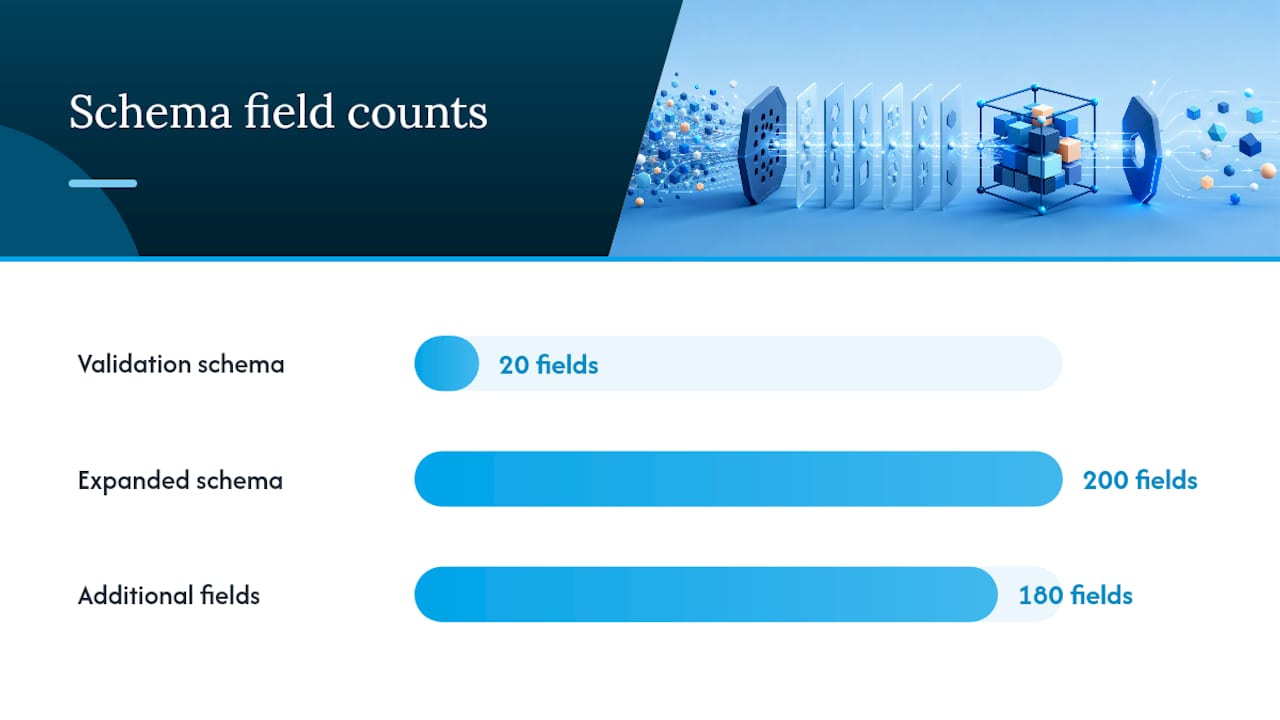
The evidence for step three is worth dwelling on. ExtractBench's schema breadth findings show that extraction reliability is not a fixed property of a model, it is a function of how many fields you ask for and how long the source document runs. A pipeline validated on 20-field schemas tells you very little about how it will behave once you add another 180 fields for a more complex form.
Statistic to weigh carefully: rather than trusting a single accuracy percentage from a vendor's marketing page, ask for their results on a schema and document length that match your actual use case, because benchmark evidence shows accuracy figures collapse quickly outside the conditions they were measured under.
Storage choices matter too. Structured outputs commonly land in relational databases for tabular data, graph databases for relationship-heavy extractions like contract clause networks, or NoSQL stores when schemas vary document to document, a distinction covered in detail in the survey on document parsing and extraction.
Who builds these pipelines: Real-studios' approach to extraction projects
Real-studios, trading as AIthatworks, is a Manchester-based AI consultancy that builds tailored agents, automations and integrations for UK businesses. Extraction and document processing projects sit squarely inside that remit, sitting alongside the RAG, voice, chat and email agent work that forms the consultancy's core offering.
Delivery on extraction projects typically maps to a small set of services:
- Automations, for pipelines that move extracted data from documents straight into existing business systems without manual re-entry.
- Integrations, for connecting extraction outputs to ERPs, CRMs and data warehouses that already run the business.
- AI Studio, for teams building a custom extraction or RAG pipeline from the ground up rather than bolting one onto an existing system.
Real-studios pairs that build capability with Generative Engine Optimisation, ensuring the businesses it works with remain visible as search shifts toward AI-generated answers rather than traditional rankings. Projects run with ongoing support after launch rather than a one-off handover, which matters for extraction pipelines specifically, given how often a schema needs revising once real-world documents start arriving.
Build, buy or hire: choosing the right first project
Prototype in-house when your corpus is small and low-latency answers matter more than perfect accuracy. Buy a managed extraction API when your schema is well-defined and you want reliability without engineering overhead. Hire a specialist consultancy once schemas get complex, governance requirements appear, or you need production-grade uptime.
Three sensible starter projects: an invoice extraction pilot to prove reconciliation savings quickly, a literature extraction pilot to test schema-guided extraction on messy academic PDFs, and a RAG ingestion trial to see how well your documents survive being turned into a searchable corpus. Each answers a different question about your real constraints before you commit budget.
— Oded
Getting from pilot to production with Real-studios
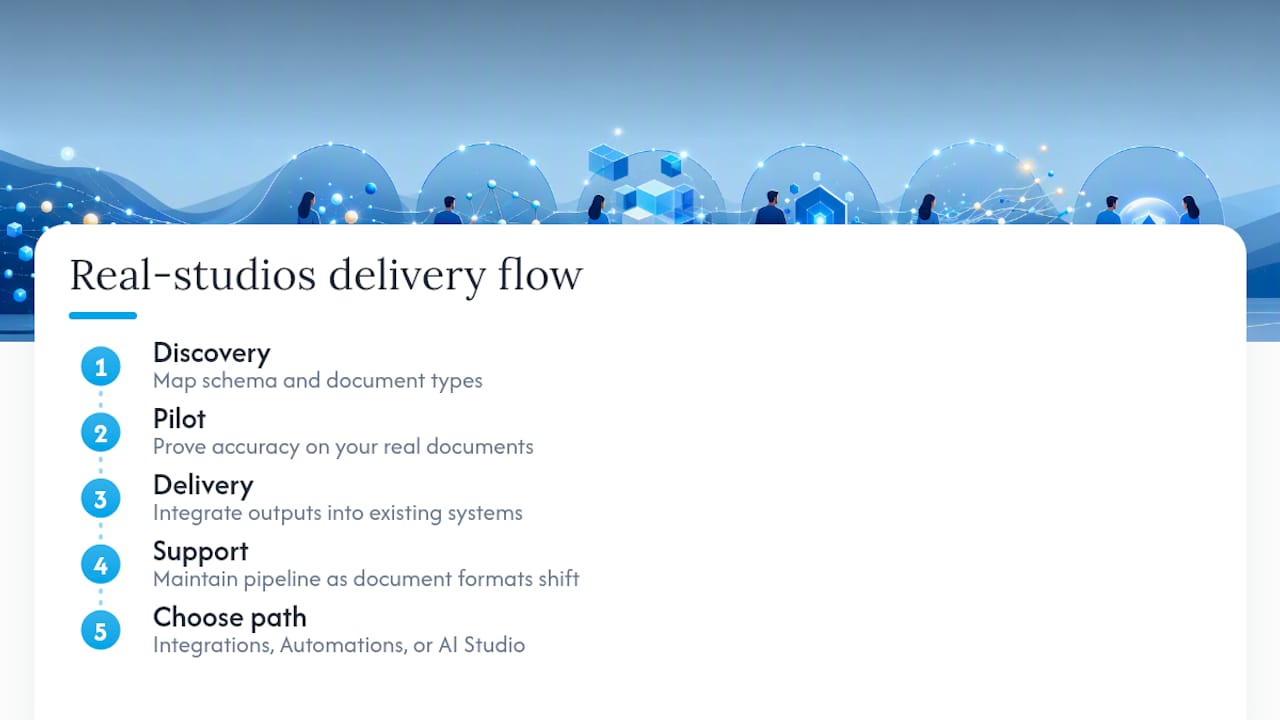
The gap between a promising extraction demo and a pipeline your finance team trusts is usually validation, monitoring and integration work, not the extraction model itself. Real-studios closes that gap through a discovery, pilot, delivery and support flow: discovery to map your schema and document types, a pilot to prove accuracy on your real documents rather than a vendor's sample set, delivery into your existing systems, and support afterwards as document formats inevitably shift.
For teams wanting extracted data flowing directly into existing platforms, the Service Integrations page covers connecting pipeline outputs to ERPs and CRMs. For document-heavy workflows that need the manual step removed entirely, Service Automations outlines how that gets built. If you are starting from scratch rather than bolting extraction onto something existing, the AI Studio overview is the place to start. Book a discovery call to scope your first pilot before committing to a full build.