Cut ACW 35% with Call Summarization AI and CRM Integration for CX Ops
AI call summarisation converts voice calls into structured, CRM-ready summaries automatically, cutting after-call work and standardising documentation across teams. It works well for high-volume contact centres and sales teams once transcription accuracy and CRM integration are handled properly. The pipeline runs from transcript to AI model to CRM record, and the weak point is almost always transcription quality or a poorly mapped integration, not the summarisation model itself.
TL;DR:
- Transcription quality and CRM mapping are the main weaknesses, not the summarisation model itself, affecting overall accuracy and usefulness.
- A typical contact center sees a 35% reduction in after-call work time, but accurate implementation depends on proper baseline tracking and validation.
- Post-call summaries generally outperform real-time ones in accuracy, especially for speaker attribution, guiding the choice between synchronous and asynchronous processing.
- Data should flow directly into CRM systems through integrated pipelines to enable automation of follow-up tasks, quality checks, and agent trust.
- Pilots should define clear success metrics, involve all stakeholders early, and run in staging environments to minimize errors before full-scale deployment.
Table of Contents
- What are the measurable benefits of call summarisation AI?
- How does call summarisation AI actually work?
- How do you connect summaries to your CRM and QA workflows?
- What accuracy risks come with automated call summaries?
- How do you pilot and scale call summarisation safely?
- What do UK deployments get wrong most often?
- Should you buy a feature, extend your CCaaS, or hire a consultant?
- Turning summaries into a working pipeline with Real-studios
- Sources
What are the measurable benefits of call summarisation AI?
Contact centres adopting AI call summaries are not chasing a novelty feature. They are chasing agent capacity. Metrigy research cited by Zoom found average handling time for after-call work dropped from 16.2 to 10.4 minutes per call, a roughly 35% reduction. That is the single figure most pilots get measured against.
Pro Tip: Track ACW minutes per call for two weeks before your pilot starts. Without a clean baseline, you cannot prove the reduction to finance later.
The knock-on effects matter more than the headline number:
- Agents move to the next call faster instead of typing notes from memory
- CRM records become consistent because every summary follows the same structure
- QA teams can review a higher proportion of calls in the same time, since structured summaries feed analytics and QA workflows directly
- Sales teams close follow-ups quicker because objections and next steps are logged the moment the call ends
Roughly half of companies surveyed already use transcripts to manage staffing decisions and QA improvements, which tells you this has moved past the experimental phase for many operations.
How does call summarisation AI actually work?
The pipeline has four distinct stages, and understanding each one tells you where accuracy problems will originate.
- Speech-to-text transcription. Automatic speech recognition (ASR) converts the audio into text. Speaker diarization separates the transcript into "Agent" and "Customer" turns, which is where speaker mislabelling tends to creep in on noisy or crosstalk-heavy calls.
- Natural language processing. The transcript gets parsed for entities, intent and sentiment before summarisation begins.
- Summarisation itself. Extractive summarisation pulls key sentences verbatim from the transcript. Abstractive summarisation, the more common approach now, generates new sentences that paraphrase the call using a large language model, guided by a prompt that specifies the fields you want back.
- Structured output generation. The model returns fields such as call overview, action items, owners, timestamps and next steps, ideally as structured data rather than free text.
The real design decision is real-time versus post-call processing. Real-time summarisation gives agents live prompts during the call, which helps with coaching but works with a partial transcript and less context. Post-call, asynchronous processing waits until the full audio is available, and this usually produces meaningfully higher speaker-attribution accuracy because the model has the entire conversation to work with rather than a rolling window. Most contact centres run both: real-time for in-call nudges, async for the definitive record.
How do you connect summaries to your CRM and QA workflows?
A summary that sits in a call recording platform and never reaches Salesforce or HubSpot has no operational value. Otter push summaries, extracted action items and drafted follow-up emails straight into CRM records, which is the pattern worth replicating regardless of which vendor you use.
The integration itself typically runs through one of three patterns:
- A webhook fires when the call ends, sending the transcript to your summarisation service
- An API call returns structured JSON with discrete keys such as
next_step,owner_id,due_dateandobjections - Middleware applies per-account mapping rules before writing to the CRM schema, which matters when different teams use different field names
Field mapping deserves proper thought rather than a default configuration. Map next steps, due dates, the responsible owner and any objections raised, since these four fields drive nearly every downstream automation: task creation, drafted follow-up emails, and QA flags for calls that need review. Otter.ai's sales workflow guidance shows this extended further, extracting MEDDIC or BANT-style deal fields directly from the transcript.
Pro Tip: Run summaries into a staging CRM environment for at least two weeks before going live. Noisy or mismapped data in production is far harder to unwind than a delayed launch.
What accuracy risks come with automated call summaries?
Every summarisation error traces back to one of two sources: bad transcription or bad prompting. Word error rate and diarization failures are the primary limiting factor, because a single misheard word or misattributed sentence propagates straight into the CRM record and any QA score built on top of it.
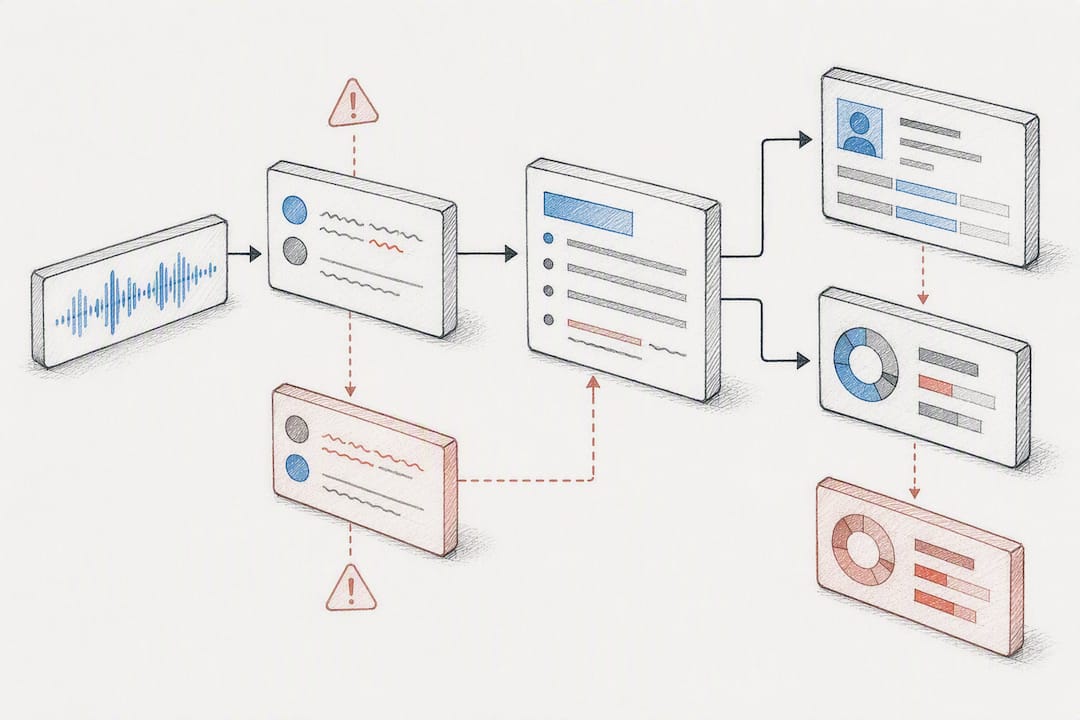
Large language models also hallucinate, occasionally inventing a commitment nobody made or attributing a statement to the wrong speaker. Confidence thresholds and human review on low-confidence fields catch most of this before it reaches a customer record.
Governance checklist before you rely on summaries operationally:
- Redact PII during transcription, not after, and set clear retention periods
- Keep an audit log of every summary and any edits made to it
- Flag any field below your confidence threshold for human review rather than auto-publishing it
- Make every summary editable by the agent before it locks into the CRM
Custom vocabulary lists and async processing both measurably reduce transcription errors on domain-specific calls, particularly where product names or industry jargon confuse a general-purpose ASR model.
How do you pilot and scale call summarisation safely?
A structured pilot beats a full rollout every time, because it lets you tune the model and your mapping rules before noisy data reaches every agent's CRM record.
- Define the pilot scope. Pick one team, one call type, and a sample size large enough to be statistically meaningful, usually a few hundred calls minimum.
- Set success metrics upfront. ACW reduction, CRM field accuracy and QA coverage percentage are the three that matter most.
- Check technical prerequisites. Confirm audio capture quality, storage and retention policy, recorded consent, and build a custom vocabulary list for your product names and jargon.
- Bring in the right stakeholders. IT, Data Protection, QA and Sales leadership all need a seat before integration begins, not after.
- Build a monitoring plan. Dashboards tracking error rates, low-confidence flags and agent edit rates tell you when the model needs retuning.
Starting with full post-call coverage in a controlled pilot before enabling any real-time assist is the safer sequencing, since it lets you build a clean QA dataset first.
Pro Tip: Review agent edit rates weekly during the pilot. A rising edit rate usually means your vocabulary list or prompt needs adjusting, not that the model has failed.
What do UK deployments get wrong most often?
Most failed rollouts share one root cause: the summary sits in a silo. It looks impressive in a demo, then nobody wires it into the CRM, and agents quietly go back to manual notes within a month.
The consultancies that get this right route action items into the CRM first, before anything else, and only then layer in QA scoring and coaching dashboards. Surfacing low-confidence fields for human review, rather than hiding them, is what earns agent trust in the system.
Some consultancies build these pipelines for contact centres and sales teams as custom integrations rather than off-the-shelf plug-ins, mapping each client's own CRM schema and call structure from the outset. The recurring pitfall is treating summarisation as a standalone tool instead of the first stage of a wider automation, where action items, follow-up drafts and QA flags all move automatically once the transcript lands.
Should you buy a feature, extend your CCaaS, or hire a consultant?
Off-the-shelf summarisation features suit start-ups wanting speed with minimal customisation. Extending your existing CCaaS platform suits scale-ups that need moderate control without rebuilding infrastructure. Regulated enterprises, or anyone needing tight CRM mapping and data governance, usually get more measurable value from commissioned integration work, where the trade-off shifts firmly towards control over speed.
— Oded
Turning summaries into a working pipeline with Real-studios
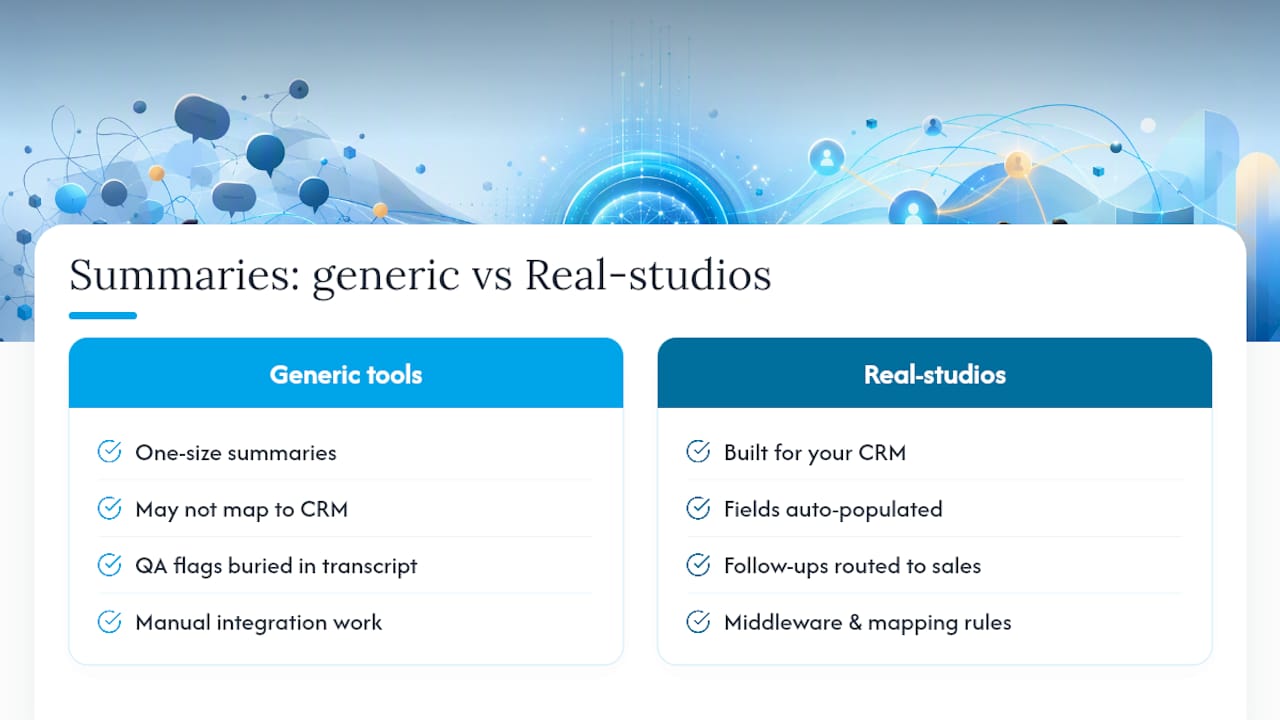
Real-studios is the direct alternative to stitching together disconnected vendor tools for call summarisation. Rather than adopting a generic summarisation feature and hoping it maps to your CRM, you get a pipeline built around your actual schema, call types and QA process from day one. That means action items land in the right field, follow-up drafts appear where your sales team already works, and QA flags surface automatically instead of getting buried in a transcript nobody rereads.
Real-studios' automation pipelines handle exactly this: routing structured summary outputs into CRM and task systems, with integration work covering the middleware and mapping rules that keep data clean as you scale. Some clients typically see reduced ACW, automated CRM updates and measurably better QA coverage within the first pilot cycle.
If you are ready to scope a pilot, get in touch about a call summarisation implementation to explore how a pipeline can be mapped against your current CRM setup.
Sources
For deeper technical detail beyond this guide, AWS's architecture notes on generative call summarisation cover real-time versus async trade-offs in more depth. Gladia's guidance on transcription accuracy is useful for anyone building custom vocabulary lists. For how summaries actually get consumed day to day, Live Caption AI's breakdown of usable summary formats is a solid practical reference.
- 4 game-changing benefits of AI-based transcripts and summaries in CX | Zoom
- Otter
- Call Summary Automation in Contact Centers | NiCE
- Use generative AI to increase agent productivity through automated call summarization | AWS
- AI call summaries for support and sales calls: automatic post-call recaps | Gladia