Avoid DPIA Mistakes: AI Email Triage for UK SMEs in 7 Steps
AI email triage uses machine learning to score priority, classify intent, draft replies and route messages to the right person or folder without manual sorting. For most SMEs, a managed integration or consultancy-led pilot beats a pure off-the-shelf tool or a fully bespoke build, because it balances speed with the compliance groundwork the ICO's AI guidance requires. Before production, expect a Data Protection Impact Assessment and a signed processor contract. Consultancies often run this kind of pilot.
TL;DR:
- Using automation flows can provide traceability essential for regulated firms, while agent-based approaches handle nuance but are harder to audit.
- A pilot should run for four to six weeks with labeled feedback and strict compliance documentation, including DPIAs and processor contracts.
- Regular monitoring involves tracking draft acceptance rate, time saved, missed urgent emails, and false positives, with quarterly retraining to prevent model drift.
- Choose implementation architecture based on risk tolerance and control needs, with plugins suitable for quick tests and agents for scalable, compliant solutions.
- Off-the-shelf tools often lack nuanced compliance features, making consultancy-led development preferable for complex or highly regulated email triage requirements.
Table of Contents
- What does AI email triage actually do?
- Which implementation approach fits your business?
- How to implement AI email triage: a 7-step checklist
- Data protection, DPIAs and practical compliance steps
- Maintain, measure and tune your triage system
- How do popular AI email triage tools and platforms compare?
- When should you hire a consultancy instead of buying off-the-shelf?
- How Real-studios can help you deploy this
- Authoritative guidance and partner resources
- Sources
What does AI email triage actually do?
Four functions sit at the core of any AI email triage system: priority scoring, intent classification, auto-draft generation, and routing with archive cleanup. Priority scoring ranks messages by urgency using signals like sender history, deadline language and past response patterns. Intent classification tags each email as a query, complaint, invoice or sales lead. Auto-draft generation produces a reply for a human to approve or edit, rather than sending anything unsupervised. Routing then sends the message to the right inbox, ticket queue, or archive folder.
Day to day, this looks like: urgent client messages surfacing above newsletters within seconds of arrival, fewer missed service-level agreement deadlines because nothing sits buried on page three of an inbox, and a morning briefing that summarises what actually needs a decision today.
The productivity case is measurable, not theoretical. One study of 500+ firms found AI-driven segmentation cut email production time from 4.2 hours to 47 minutes on comparable campaigns, and lifted click-through rates by up to 53% in one cohort. Those numbers came from marketing workflows, but the same principle, that structured AI review beats manual sorting on speed and consistency, applies directly to inbox triage.
Which implementation approach fits your business?
Three broad architectures dominate the market, and the right one depends on your risk tolerance and existing stack, not just your budget.
- Agent or assistant. An AI agent reads, classifies and drafts autonomously, learning from feedback over time. It handles nuance well but is harder to audit line by line, which matters if a regulator or client ever asks why a message was routed a certain way.
- Automation flows. Tools such as Power Automate or n8n use deterministic rules and text classification models to route mail. Microsoft's own tutorial for triaging email with Power Automate shows this pattern well: every decision is traceable, which suits regulated firms, but edge cases need manual rule updates.
- Inbox-layer plugins. Lightweight add-ons bolt onto Outlook or Gmail for a fast pilot. They are the quickest to trial but give you little control over data handling or model behaviour at scale.
Pro Tip: Start with an automation flow if you need to show a regulator or an auditor exactly why an email was flagged. Move to an agent-based approach only once you trust the training data and have a human-review gate in place.
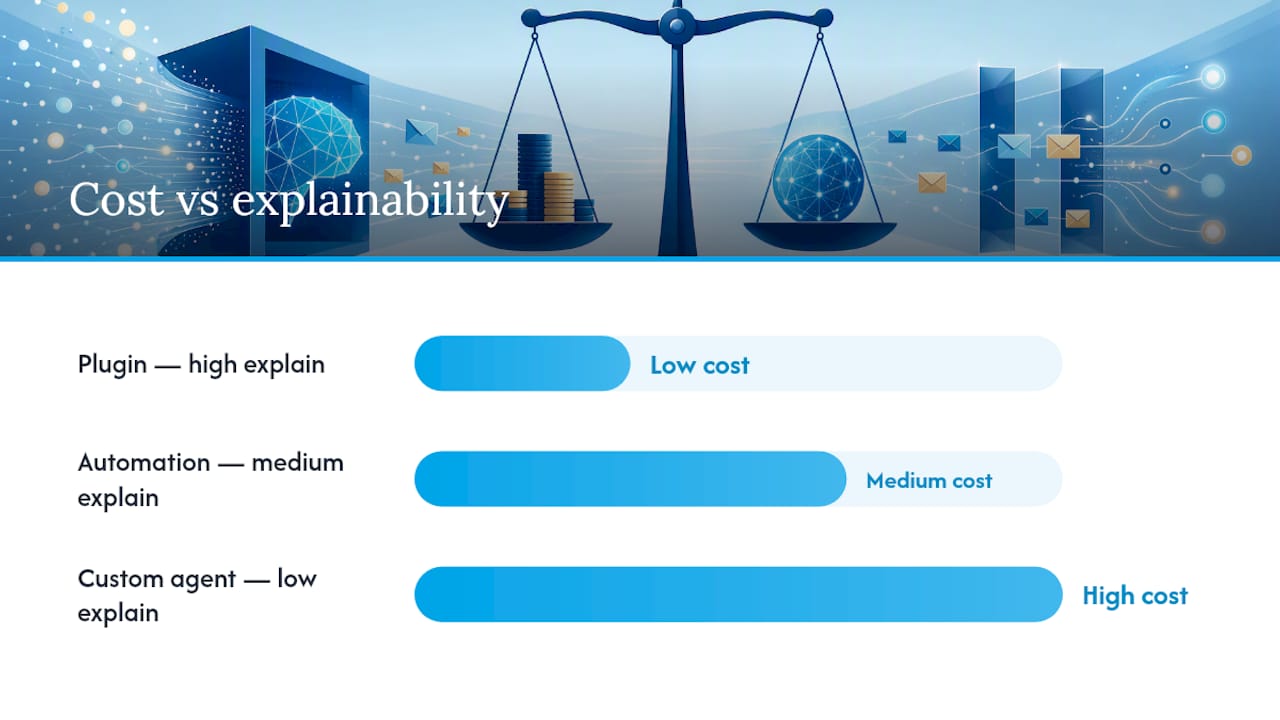
Cost rises roughly in this order: plugin, automation flow, custom agent. Explainability runs in reverse.
How to implement AI email triage: a 7-step checklist
A structured rollout protects you from the two most common failures: poor data mapping and skipping compliance until it is too late.
- Define outcomes and KPIs. Set targets for SLA adherence, draft acceptance rate and time saved per user before writing a single rule.
- Map mailboxes and connectors. List every shared inbox, CRM and ticketing system that needs a feed into the triage layer.
- Choose your architecture. Pick between agent, automation flow, or plugin based on the trade-offs above, and shortlist a consultancy or vendor accordingly.
- Design templates and refusal rules. Draft response templates for common intents and set clear rules for when the system must escalate to a human rather than reply.
- Pilot with labelled feedback. Run a four to six week pilot, measuring draft acceptance and false-positive rates against real inbox volume.
- Complete your DPIA and processor checks. Confirm lawful basis, document the assessment, and sign a written contract with any processor before going live.
- Roll out with monitoring and a retraining cadence. Launch with audit logging switched on and a fixed schedule for reviewing performance.
Skipping step six is the costliest shortcut SMEs take. Firms that treat models as set-and-forget see accuracy decay of roughly 18% per quarter without ongoing review, according to maintenance data from Arete, which is exactly the kind of drift a retraining cadence is designed to catch early.
Data protection, DPIAs and practical compliance steps
A DPIA becomes mandatory under UK GDPR Article 35(3)(a) when your AI system carries out large-scale profiling or automated decision-making likely to result in high risk to individuals, and email triage that scores, categorises and prioritises correspondence from clients or the public typically qualifies. The ICO's guidance on AI and data protection sets out what the assessment must record and stresses fairness, transparency and accuracy as ongoing obligations, not a one-off tick-box exercise.
A DPIA should document the specific processing operation, the necessity and proportionality of the automated system, and the risks to individuals, alongside the measures taken to address those risks. This is a living document, revisited whenever the system or its data sources change materially.
Before going live, work through the following list:
- Choose and record a lawful basis for processing, then update your privacy notice to reflect the automated element.
- Document who is the controller and who is the processor, and put a written contract in place, not a verbal agreement or an assumption based on a vendor's marketing copy.
- Apply data minimisation: only feed the system what it needs to classify and draft, not entire mailbox histories by default.
- Keep a human-in-the-loop gate for anything client-facing, with logging so decisions remain explainable after the fact.
Maintain, measure and tune your triage system
Track four numbers weekly: draft acceptance rate, time saved per user, the percentage of genuinely urgent emails missed, and the false-positive rate on flagged messages. A pilot that measures draft acceptance and rejection reasons gives the fastest read on whether a workflow is ready to scale beyond a small team.
Set a maintenance rhythm: weekly feedback review, monthly checks on model behaviour, and quarterly retraining. Data drift and stale templates are the usual culprits behind a sudden drop in accuracy, and the fix is almost always the same: log every rejected draft with a reason (thin data, model overreach, wrong CRM record) and feed that log straight into the next retraining cycle.
Pro Tip: Bind every generated commitment, a date, a price, a promise, to a verified CRM field or meeting note. This single guardrail stops more embarrassing client emails than any amount of extra training data.
How do popular AI email triage tools and platforms compare?
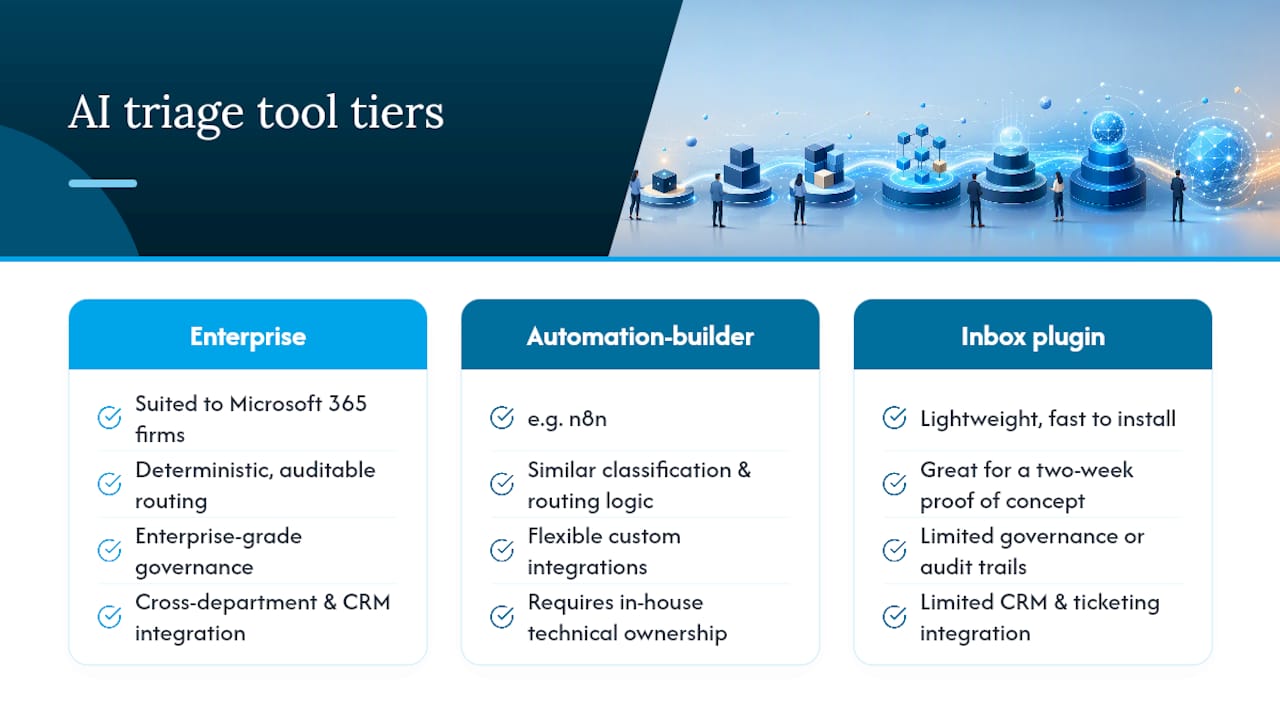
The market splits broadly into three tiers. Enterprise platform tools built on Microsoft 365, using Power Automate and Copilot together, suit firms already standardised on that ecosystem and needing deterministic, auditable routing across departments. Automation-builder tools like n8n offer similar classification and routing logic but with more flexibility for custom integrations outside the Microsoft stack, at the cost of needing in-house technical ownership.
Inbox-layer plugins sit at the lighter end: fast to install, useful for a two-week proof of concept, but limited once you need enterprise-grade governance, audit trails, or integration with a CRM and ticketing system simultaneously.
None of these tiers is universally "best." The right choice depends on whether your priority is speed to pilot, depth of audit trail, or breadth of integration. A firm handling regulated client communications generally needs the auditability of an automation flow or a consultancy-built agent; a small team just trying to stop urgent enquiries getting buried can often start with a plugin and graduate later. What matters most is matching the tool's control level to your actual compliance exposure, not picking whatever ranks highest on a review site.
When should you hire a consultancy instead of buying off-the-shelf?
Bespoke integrations, regulated client communications, or triage that needs RAG-based context retrieval from your own documents all favour consultancy-led delivery over a generic tool. Off-the-shelf plugins rarely handle nuanced routing logic or industry-specific compliance out of the box.
Expect a pilot to run four to eight weeks. Vet any consultancy on three things: proof of comparable integrations delivered, a documented governance process covering DPIAs and processor contracts, and confirmed post-launch support rather than a one-off handover.
— Oded
How Real-studios can help you deploy this
Some consultancies build email agents with retrieval-augmented context, so drafts reference actual CRM records and past correspondence rather than generic templates. Projects typically move through discovery, where mailboxes and connectors get mapped, then a pilot with labelled feedback, followed by a monitored roll-out with an agreed retraining cadence. The integrations service covers the CRM and mailbox connectors that make triage reliable rather than a novelty. For teams that also want visibility in AI search results alongside operational email automation, Generative Engine Optimisation work can extend the same technical groundwork into how a business gets found. If you're ready to scope a pilot, the service automations page is the place to start an enquiry.
Authoritative guidance and partner resources
For primary sources: the ICO's AI and data protection guidance, Microsoft's Power Automate triage tutorial, and background on automation strategy for vendor diligence.